







Brilliant piece of software. I was extremely optimistic about this and how much time it would save but it was better than I could even imagine. It just works easily, I couldn't recommend this enough to someone thinking about using it.

Link My Books is a lifesaver for importing Amazon transactions into Xero and handling all the different VAT scenarios that comes with. Great team and very helpful and quick to respond to questions. Thanks!
Outstanding app. Far superior to the previous 'solution' I used. I was able to sign up and integrate in a few minutes, and then add my accountant as a user. Simples! My accountant loves it, it's a MASSIVE game changer. I'm converted! Oh and the customer support is incredible.
Great to see that there is someone else out there offering an automated solution to the posting of amazon settlements within Xero. I have been using a competing product for a while and I always felt they were massively overcharging for the service - so it was a quick decision to move to LinkMyBooks based on the price alone; fortunately the service model backs it up too, they respond to any queries extremely quickly.
The U.K was in need of an Amazon reprting system and Link My Books is just that system no more worrying about vat reporting. The customer service from the team there has been amazing too can't recommend this software enough.
Brilliant service and at a great price. If you are considering A2X then stop, and go with Link my books. Saved us 10+ hours per month of manual spreadsheet work.
Link My Books has been great! Once all setup (which is not that hard) it is just a few clicks for everything to be fully reconciled with Xero. Saves me so much time. I'd also echo the previous comments - The customer support is excellent.
Really happy with Link My Books so far, I'm pretty new to it but setup was very straightforward and I got an immediate response to a question when I was setting this up at 9pm on a Sunday night, can't ask for better support than that! It looks like it's going to save me a lot of time on manually importing data. You should definitely try LMB out!
Fantastic app, incredible customer service and super competitive pricing. I'm so happy I opted to go for Link My Books instead of the alternative services I was considering. Highly recommend!
Great product & fast replies when you need help. Highly recommend.
Great to keeping up to date with your accounts would recommend
great little App does the job for a fraction of the price of others. Support from the team is great too
We have been using some great software to reduce the work needed to unscramble Amazon payments, nothing wrong with it and it worked with some minor adjustments. Then we were told about LMB. I was sceptical at first but this is even better! Sorts out the info, deals with the VAT correctly, gives you an EC Sales list and maintains the great level of service and feedback too. As if that wasn't enough for us to change over they have an Accountants package that reduces the cost.
great tool for linking Amazon to Xero, easy integration, great value! Would highly recommend to anyone needing to automate settlements into Xero!
LinkMyBooks is an essential software for any Amazon seller doing bookeeping with Xero. Its a real time saving in getting all the Amazon settlements costs broken down and into Xero. Unlike other competitor software, its affordable for new sellers and the customer support is first class!
After considering various alternatives, we decided on Link my Books to automate our Amazon Europe marketplace settlements to Xero. This was based on the excellent reviews by other users of the app, the reasonable price of the app compared with its main competitor A2X and the responsiveness and helpfulness of Daniel to our questions. Setting up the app was very straightforward based on the very clear set up instructions provided, and the app appears to be working perfectly now that we have set it up! Thank you Dan!
Has taken a big weight off my shoulders, everything automatically gets logged into Xero I can now take the saved time to work on finding new products. LMB are a VERY helpful bunch and I mean VERY !!!!!
I cannot recommend Link My Books more highly. Rarely does one find a programme that answers all one's prayers - but Link My Books is just the ticket for those struggling to break down their Amazon account transactions. The staff are super-helpful and very quick to respond. The software is also SUCH wonderful value! I am delighted that I found this service, it's saved me hours, honestly.
After having issues with other apps linking Xero to Amazon and battling through horrendous Amazon reports we found Link My Books and it's a total game changer for our -commerce clients. It does exactly what it's supposed to, easy to set up, deals with multi-currencies perfectly and the support is second to none. Super friendly and very quick to resolve queries. Highly recommened
I cannot praise LMB enough. The software is great and the support is unparalleled. Daniel has made himself available to us and spent a long time helping us, not once making us feel that we were taking up his time.
I cannot praise Dan at Link My Books enough. He has been knowledgeable and supportive, assisting with the set up of my first Amazon clients marketplaces and Xero integration. I will be setting up two more this week! Customer support and service has been amazing.


Check the Processing Logs for that period. If any logs show "Failed" status, settlements won't be created. You can click "Reprocess Failed Logs" to retry. Most issues resolve after one reprocess. If the issue persists, contact support.
Xero and QuickBooks. Deferred and released entries are posted directly to your books as settlements, with clear naming so you can identify every entry. A dedicated "Amazon Deferred Balances" account (Other Current Asset) tracks the outstanding balance.
Deferred transaction tracking starts from the date you choose during setup. Historical data before that date is not retroactively adjusted. Since we post separate entries for deferred transactions your normal settlements are not affected.
Go to Settings, then Settlement Settings, then Revenue Recognition. Enable Deferred Transaction Adjustments, choose a start date, and click Save. That's it — Link My Books handles everything automatically from there.
B2B orders with 30-day credit terms are handled the same way. Link My Books identifies them, recognises the revenue in the correct period, and reverses when Amazon settles. The settlement naming convention distinguishes B2B deferrals from DD+7 deferrals so you always know the reason.
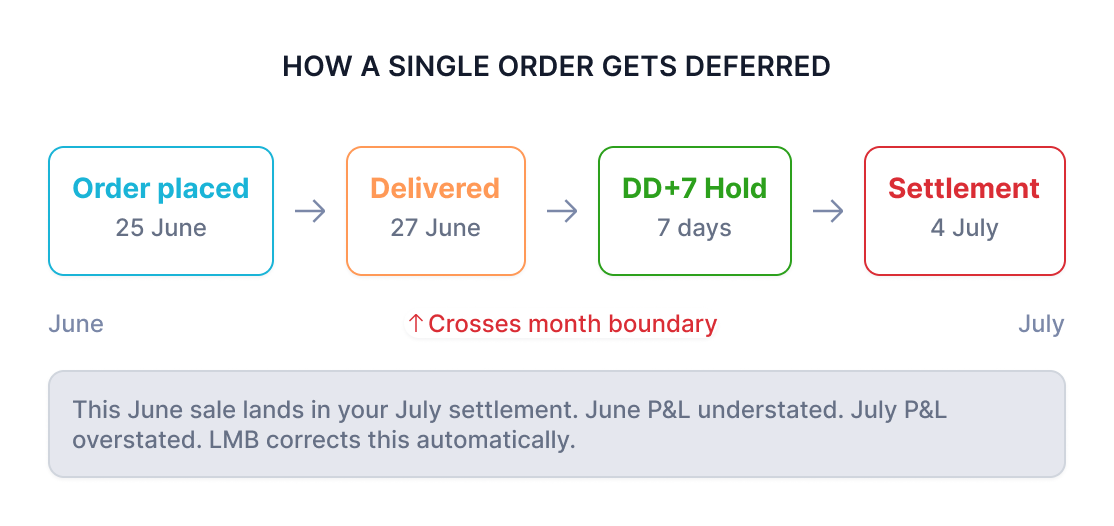
Link My Booksidentifies orders with order dates in the current month that haven't been included in a settlement yet. It creates a "deferred" recognition entry in the correct month, then automatically creates a "released" reversal entry when Amazon eventually pays out — preventing double-counting.
Because Amazon's DD+7 and B2B deferral policies delay payment for sales made late in the month. A sale on June 25th might not appear in your settlement until July. Your June P&L is missing revenue; your July P&L shows extra. Link My Books corrects this by recognising revenue in the month it was earned.
Orders where Amazon withholds the seller's funds from the current payout. Common reasons: DD+7 (7 days after delivery for B2C orders), B2B credit terms (30 days for business buyers), or unspecified Amazon holds. The funds are released in a later settlement period.


.png)
