



This article provides general information only and does not constitute tax advice. For advice on your specific situation, speak with a qualified accountant or HMRC.
HMRC now receives more data about what people earn on marketplaces, including Amazon. Digital platforms collect seller details and yearly income figures, then report them to HMRC the following January.
That does not create a “new Amazon tax.” It changes visibility. If you sell regularly, aim for profit, or run Amazon like a business, you need clean records and the right filing route. If you rely on payouts and spreadsheets, you risk overpaying, underpaying, or getting an HMRC letter because your numbers do not add up.
Key Takeaways from this Post
HMRC can match Amazon selling activity against what you file because platforms report seller income and details annually.
Amazon bookkeeping gets messy fast because payouts do not equal profit once you factor in fees, refunds, ad spend, and VAT treatment.
Link My Books automates the hard part by turning Amazon settlement data into clean summaries inside Xero or QuickBooks.







2026 Update: HMRC Starts Side Hustle Tax for Amazon Sellers
The update for 2026 is a combination of:
- Platform reporting: UK digital platforms report sellers to HMRC.
- More open calls: HMRC has openly messaged online sellers about reporting and compliance, especially where platforms share data.
- Making Tax Digital pressure: From April 6, 2026, HMRC requires Making Tax Digital for Income Tax for sole traders and landlords with qualifying income over £50,000.
Do You Have to Declare All Amazon Income to HMRC?
If Amazon selling counts as trading, yes. You declare taxable profit, not “what hit your bank.”
Two points matter most:
- Platform reporting thresholds do not decide your tax bill: HMRC’s public comms highlight that if you sold at least 30 items or earned about £1,700 (the €2,000 figure) in a year, the platform may share your info with HMRC.
- Trading allowance still exists: You can earn up to £1,000 in trading income each tax year as a tax-free allowance in many cases. Past that, you often need to register and file, depending on your situation.
If you only sell your own personal items occasionally (and you do not buy to resell for profit), you may fall outside trading. HMRC looks at the pattern and intent, not the platform name.
Why HMRC Updated Its Policy for Private Amazon Sellers
HMRC tightened its approach because online selling now produces cleaner, more searchable data.
Digital Platforms Now Report Seller Income Data
HMRC’s guidance makes it clear - digital platform operators collect seller details and income information for the calendar year, then report it to HMRC by the following January.
Online Selling Creates a Big Gap Between “Payout” and “Profit”
Amazon payouts bundle a lot of activity into one net deposit. By the time you subtract fees, FBA charges, refunds, promo discounts, and ad spend, the taxable profit can look very different from the match, which causes most of the real-world problems:
- You file using the wrong revenue figure.
- You miss deductible expenses.
- You mis-handle VAT on mixed-rate products.
- Your accounts do not reconcile cleanly, so you cannot defend the numbers if HMRC asks.
HMRC Is Moving to Digital Record-Keeping and More Frequent Updates
Making Tax Digital for Income Tax starts April 6, 2026 for qualifying income over £50,000, then expands in later years.
With the increasing number of sellers on Amazon, consistent monthly bookkeeping becomes a necessity and the best possible way to avoid annual spreadsheet panic.
What to Do If You’ve Received an HMRC Amazon Letter
An HMRC Amazon seller letter typically acts as a “nudge,” not an invoice. It signals that HMRC believes you have Amazon income that may not match what you declared.
Here’s a clean response plan:
Step 1: Verify it’s genuine: Use official GOV.UK guidance and contact routes, not phone numbers or links printed in a suspicious letter.
Step 2: Rebuild your true figures: Start from Amazon settlement-level data, then separate sales, fees, refunds, and ad spend so you land on profit, not payouts.
Step 3: Compare against what you filed: If you under-reported or did not file, document your calculations and consider professional support.
Step 4: Fix the system, not just the year: Put a monthly reconciliation process in place so the same issue does not repeat next January.
How Link My Books Simplifies Amazon Tax Filing
Link My Books turns Amazon settlement chaos into clean, HMRC-ready books inside Xero or QuickBooks. Instead of treating your Amazon payout like revenue, it imports each payout and builds a bank-matched summary entry that breaks the settlement into the parts that drive taxable profit.
Reconciliation becomes straightforward - when the summary entry matches the deposit, you stop losing hours to spreadsheet cleanups and month-end stress.
What Link My Books does for Amazon sellers:
- Bank-matched payout summaries: Creates a summary entry for each Amazon payout that matches what hits your bank, with a breakdown of sales, refunds, fees, and taxes.
- Automatic settlement import: Pulls Amazon settlements as they generate, so you do not rely on manual downloads to keep records current.
- AutoPost automation: Automatically sends new settlements to Xero or QuickBooks, with optional start and end dates so you control exactly what period posts.
- Backdate posting for historical clean-up: Lets you use AutoPost to send older settlements efficiently, which helps when you need to rebuild prior periods after an HMRC prompt.
- VAT Product Grouping: Groups products into standard, reduced, and zero-rated categories and applies the correct VAT rate consistently. This helps prevent overpaying VAT when Amazon tax codes or mixed-rate catalogs get messy.
- European Amazon VAT logic: Uses Amazon VAT Transaction Reports and VAT Calculation Reports to assign sales and refunds to the correct VAT grouping.
- Multi-month settlement handling: If a settlement spans more than one month, Link My Books splits it by month to keep reporting clean and reconciliation workable.
- Reserved balance support: Accounts for Amazon reserved balances so your entries stay balanced when Amazon holds funds and releases them later.
- Foreign currency reconciliation help: Provides a defined workflow for reconciling foreign currency settlements in Xero when the payout arrives in your home currency.
- Optional product cost tracking: Supports monthly product cost uploads, which helps you track COGS more accurately when you want profit reporting that goes beyond “sales minus Amazon fees.”
You get Amazon books that reconcile to payouts, keep VAT treatment consistent, and give you numbers you can explain quickly if HMRC asks.
Here’s how it works, step by step:
Step #1: Link Your Amazon Account to Xero or QuickBooks via Link My Books
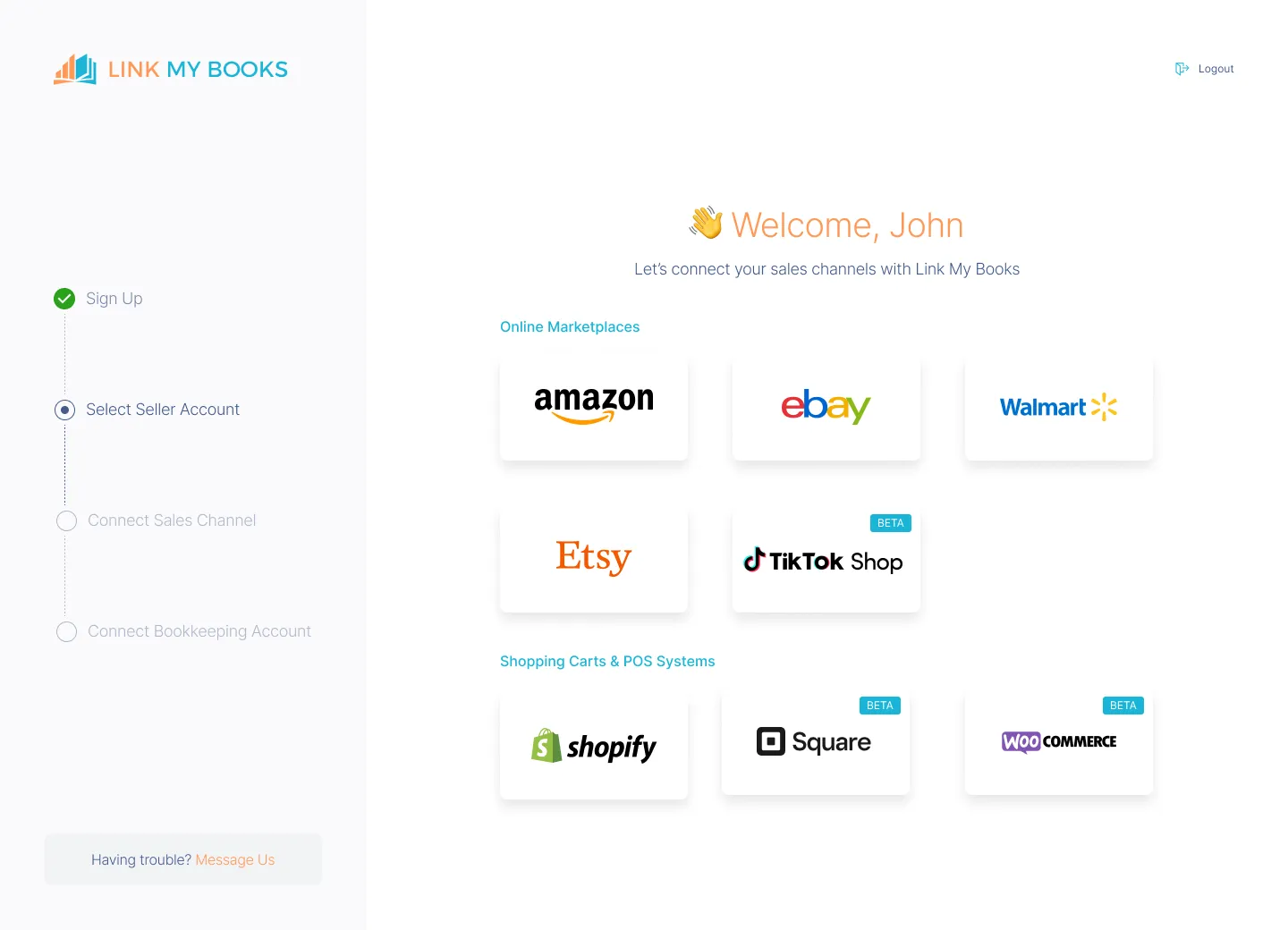
The first step in automating your Amazon bookkeeping is connecting your accounts.
- Sign up for Link My Books and connect your Amazon Seller account.
- Link your Xero or QuickBooks account.
This setup takes just a few minutes and ensures every transaction is automatically pulled into your accounting software.
Step 2: Configure Tax Settings

Use the guided tax wizard to confirm:
- Which taxes does Amazon collect and remit
- Which taxes you must report
- Cross-border VAT (OSS) settings if applicable
Link My Books separates this automatically, so you don’t double-report taxes.
Step 3: Automate Transaction Syncing

Link My Books generates a summary invoice for each Amazon payout:
- Sales by tax status (taxable, exempt, OSS, etc.)
- Tax collected by Amazon (Marketplace Facilitator)
- Refunds
- Fees
- Net payout
This summary matches perfectly with your bank deposit, ready for reconciliation.
Step 4: Reconcile in One Click
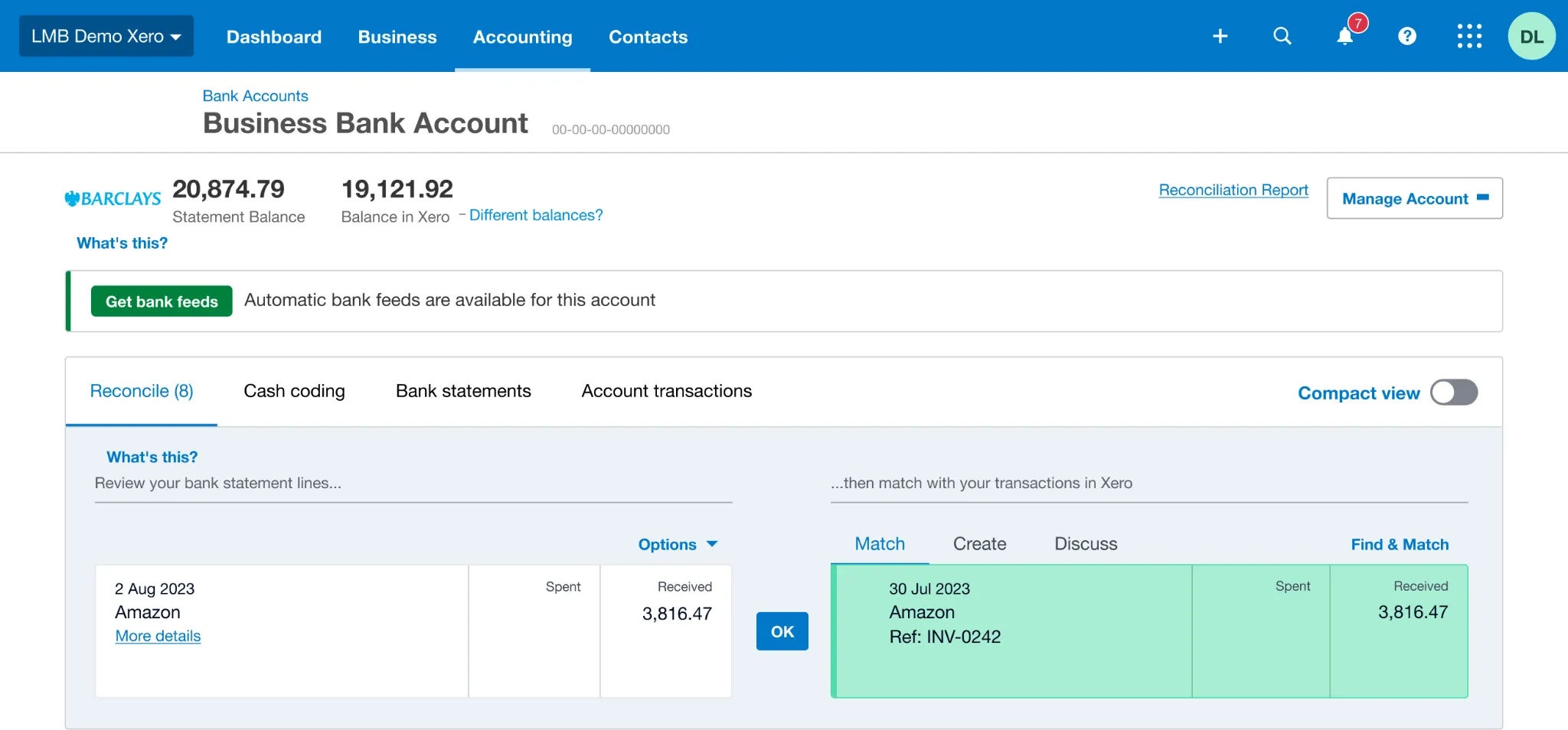
In Xero or QuickBooks, match the Link My Books invoice to your bank feed entry.
- One click - done.
Your books are accurate, tax-compliant, and audit-ready.
Link My Books also helps you:
- Match your records to your Amazon 1099-K
- Track accurate VAT for UK and EU sellers
- Handle multi-channel sales (Amazon, Shopify, eBay, Walmart, and more) - all in one system.
The result: You spend 10 minutes a month on bookkeeping, instead of hours.

👉 Start your free trial of Link My Books today and automate your Amazon accounting.
How to File Your Amazon Taxes to HMRC
Most Amazon sellers fall into one of these routes:
- Sole trader Self Assessment: Most common for small-to-mid sellers.
- Limited company filing: Corporation Tax, plus director/shareholder personal tax where relevant.
- VAT registration and VAT returns: If you are VAT registered or need to register.
- Making Tax Digital for Income Tax: If your qualifying income crosses HMRC thresholds from April 2026 onward.
Use the steps below to pick the right route and build numbers you can defend.
Not sure how to handle all that? Read our guide on how to do Ecommerce Accounting in 2026.
Step 1: Confirm Whether You’re Trading or Just Selling Personal Items
HMRC only taxes business profit.
This matters because plenty of people start casually and then drift into trading without noticing the switch. The moment you buy stock to resell, price to make a margin, and sell repeatedly, you move from clearing out stuff into running a trade in HMRC’s eyes.
A quick check:
- Likely trading: You buy items specifically to resell, you repeat the same product lines, you run promos, you aim for margin, you sell consistently.
- Less likely trading: You sell personal items occasionally, you are not buying to resell, you do not run it like a business.
If you feel unsure, jump to the Badges of Trade section below. It’s the simplest way to sanity-check your situation using HMRC’s own framework.
Know the Deadline If You Need to File
If you need to complete a Self Assessment return for a previous year and you are not already filing, HMRC expects you to register by October 5 after the tax year ends.
Pull the Right Amazon Numbers So You Don’t File Fiction
Most Amazon tax mistakes start with one assumption: “My payout is my revenue.”
It’s not.
Amazon pays you a net amount after it has taken fees, charged FBA costs, processed refunds, applied adjustments, and sometimes held reserves. Your bank deposit tells you what Amazon sent you, not what you earned, and definitely not what you profited.
To file properly, you need settlement-level data that lets you separate each moving part.
Here’s the breakdown:
The Reports Sellers Usually Miss
Amazon sellers often forget one or more of these categories:
- Refund timing differences (refund happens in a different period than the sale)
- FBA storage and long-term storage fees
- Ad spend that never appears inside the payout export they relied on
- Reserve and withheld amounts that change what lands in the bank
Step 3: Calculate Taxable Profit
Once you have sales and costs, profit becomes a simple equation:
Taxable profit = sales revenue - allowable business expenses
That sounds basic, but most Amazon mistakes happen here because sellers:
- Treat payouts as revenue
- Miss fees and ad spend
- Mis-handle returns
- Mix personal spending into business accounts
If you qualify for the trading allowance, it can cover up to £1,000 of trading income in many cases. Above that, you typically need a proper record trail.
Step 4: Register, File, and Pay Through the Right Channel
Your filing route depends on whether you trade as a sole trader or through a limited company, and whether VAT applies.
Typical patterns:
- Sole trader: You report business income and expenses through Self Assessment, then pay tax on profit.
- Limited company: The company files for Corporation Tax, and you handle personal tax separately depending on how you take money out.
- VAT: If you register or need to register, you must track VAT correctly and file VAT returns on time.
- Making Tax Digital for Income Tax: If you qualify from April 2026, you’ll need digital record-keeping and quarterly updates using compatible software.
Even if you don’t qualify for Making Tax Digital yet, adopting the habit now pays off. Amazon data gets messy fast, and HMRC pressure increases when your reported numbers don’t align with what platforms report.
Step 5: Build a Monthly Workflow That Prevents HMRC Problems
HMRC issues don’t usually come from one bad decision. They come from drift.
Month after month, sellers rely on payouts and rough spreadsheets, then suddenly they need to defend a full year of trading activity with inconsistent figures.
A simple monthly workflow fixes that:
- Reconcile payouts: Match each Amazon payout to a clean summary in your accounts.
- Keep fees visible: Track Amazon fees as a clear cost line, not as a hidden reduction of revenue.
- Handle refunds cleanly: Record refunds in a way that keeps profit reporting honest.
- Keep VAT treatment consistent: The most expensive mistakes often come from inconsistent VAT logic, especially with mixed product types.
- Store evidence: Keep reports and records organised so you can answer questions quickly.
Link internally to: how many sellers are on Amazon for context on how large the platform economy is, and why HMRC keeps tightening data matching.
What Happens If You Don’t Declare Your Amazon Earnings?
HMRC doesn’t need to guess as much as it used to. Platforms can report seller identity and yearly income figures, which makes it easier for HMRC to spot a mismatch between marketplace activity and what you filed.
If you ignore it, typical outcomes include:
- Nudge letters: A prompt to check whether you should have declared income.
- Estimated assessments: If you don’t respond, HMRC can estimate what you owe based on what it sees.
- Penalties and interest: Late filing and late payment can add meaningful cost fast.
- Time cost: Rebuilding multiple months of Amazon activity under pressure usually costs more than doing it monthly.
Key Taxes to Know for Amazon Sellers in the UK
Most Amazon sellers deal with at least one of these.
Income Tax and National Insurance
If you trade as a sole trader, you generally pay Income Tax and National Insurance on profit, not revenue. Profit depends on accurate cost tracking, and Amazon costs often run higher than sellers expect once you include fees and ads.
VAT
VAT depends on your turnover, where you sell, and what you sell.
Two points to keep straight:
- VAT registration threshold: The UK VAT registration threshold is £90,000 in taxable turnover (rolling 12 months).
- Marketplace VAT tools don’t replace your records: Even if Amazon provides VAT tooling or calculations in parts of the process, you still need correct VAT records and correct posting in your accounting.
If VAT applies to your business, treat it as a system. Inconsistent VAT logic causes overpayments and messy corrections later.
Capital Gains Tax
Capital Gains Tax can apply when you sell personal assets that increased in value. It typically doesn’t apply to normal trading stock you buy to resell, because that activity tends to fall under trading rules instead.
What Are HMRC’s Badges of Trade?
When HMRC decides whether activity looks like trading, it often relies on the badges of trade. Think of them as common-sense signals that show intent and pattern, not one single gotcha.
Badges that often show up for Amazon sellers:
- Frequency: You sell regularly rather than occasionally.
- Profit motive: You price for margin and aim to earn.
- Buying to resell: You purchase items specifically to sell at a profit.
- Organisation: You run it like a business with repeat processes and stock management.
- Sales method: You use marketplace tools like ads, promos, or listings that signal business activity.
If your Amazon activity hits several of these, treat it like a trade and keep proper books.
FAQ on HMRC and Amazon
How Do You Know If Your HMRC Letter Is Genuine?
Treat unexpected messages cautiously. Use official HMRC contact routes and GOV.UK guidance to verify what to do next. Don’t rely on phone numbers or links provided in a suspicious message.
How Much Can You Sell on Amazon Without Paying Tax in 2026?
There isn’t an Amazon allowance. Tax depends on whether you trade and what profit you make.
Some sellers reference the platform reporting exception (fewer than 30 sales and under about £1,700), but that relates to reporting, not your tax obligation. If you trade for profit, you may still need to declare income even below those levels.
Does Amazon Send VAT to HMRC?
Sometimes Amazon collects or calculates VAT in specific scenarios, but that doesn’t eliminate your need to keep correct VAT records and post transactions correctly in your accounting. Treat Amazon as a sales channel, not your VAT compliance system.
Do I Need to Tell HMRC If I Sell on Amazon?
If you trade for profit, yes. If you only sell personal items occasionally, maybe not. Use the badges of trade as your reality check, and keep records that let you show what you did and why.
Will Making Tax Digital Affect Amazon Sellers?
If your qualifying income from self-employment and property exceeds the threshold, Making Tax Digital for Income Tax starts from April 6, 2026. It requires digital record-keeping and quarterly updates using compatible software.
Final Words on HMRC for Amazon Sellers
HMRC can now compare what Amazon activity suggests against what you file, so the old way of doing things (net payouts plus a spreadsheet) breaks faster.
Amazon creates three predictable points where sellers get into trouble:
- Your sales numbers stop matching reality: If you use the payout as revenue, your books will not match what actually happened. Payouts bundle sales, fees, refunds, and adjustments into one net deposit. That makes it easy to report the wrong sales figure or the wrong timing.
- You miss or misclassify costs: Amazon fees come in many types (selling fees, FBA, storage, ads, refunds-related charges). If you don’t capture them consistently, your profit swings for the wrong reasons, and you can’t explain it quickly.
- VAT gets inconsistent: Mixed-rate products, discounts, and returns create edge cases. If you treat VAT differently month to month, you increase the risk of overpaying VAT or needing corrections later.
You want books you can defend without rebuilding a full year of settlements under pressure. That means every payout should tie back to a clear settlement summary, and your accounting should show sales, refunds, fees, and taxes as separate lines, not one blended number.
Link My Books turns Amazon settlement data into clean summaries inside Xero or QuickBooks that reconcile to your bank deposits. It keeps fees and refunds visible, posts consistently (manually or automatically), and helps keep VAT treatment consistent through product VAT grouping.
That’s how you reduce HMRC risk and cut month-end work at the same time.
If you build that system now, an HMRC nudge becomes a quick evidence exercise, not a stressful reconstruction job.

👉Start your free trial of Link My Books today - and make Amazon tax reporting simple, fast, and accurate.
Sources and Verification
Primary sources used (official):
- Selling goods or services on a digital platform - GOV.UK
- Check if you need to register as a digital platform operator - GOV.UK
- Making Tax Digital for Income Tax - GOV.UK
- Sign up for Making Tax Digital for Income Tax - GOV.UK
- Tax-free allowances on property and trading income - GOV.UK
- Increasing the VAT registration threshold - GOV.UK
- BIM20205 - Meaning of trade: badges of trade: summary - HMRC internal manual - GOV.UK
Definitions used:
- Digital platform reporting: Rules that require platforms to collect seller details and report yearly income data, with a reporting exception for fewer than 30 sales and under 2,000 euros (about £1,700).
- Trading allowance: Up to £1,000 of trading income can be tax-free in many cases.
- Badges of trade: HMRC’s framework for deciding whether selling activity looks like trading.
- Making Tax Digital for Income Tax: Digital record-keeping plus quarterly updates using compatible software for qualifying taxpayers from April 6, 2026.
- Payout reconciliation: Matching Amazon payouts to clean accounting entries that separate sales, fees, refunds, and taxes so the bank deposit ties out cleanly.
Last verified: February 27, 2026




.webp)





.png)