


.webp)
If Amazon ships your Shopify, eBay or TikTok Shop orders for you, there is a cost in your accounts you have probably never seen on its own.
It is the Amazon Multi-Channel Fulfilment (MCF) fee. Amazon charges it every time it picks, packs and ships an order you sold somewhere other than Amazon. And in your settlement data, it lands in exactly the same place as your ordinary FBA fees.
That means your Xero or QuickBooks accounts show one FBA fees line, covering two very different things: the cost of fulfilling Amazon sales, and the cost of fulfilling everyone else's. You cannot tell how much each channel really costs you to serve. You cannot see whether MCF is cheaper than a 3PL. And your Amazon channel looks more expensive than it is, while your other channels look cheaper.
Link My Books now has an add-on that fixes this. It splits the MCF per-unit fulfilment fee onto its own line so you can send it to its own account. This post explains what the fee is, why keeping it buried costs you clarity, and how to switch the split on in under a minute.
Key Takeaways from this Post
Amazon MCF fees are bundled into your FBA fees by default, so your accounts cannot show the true cost of fulfilling your off-Amazon orders.
Splitting the MCF per-unit fulfilment fee into its own account gives you accurate channel margins and a clean answer to "is MCF worth it?"
The Link My Books MCF Fee Split add-on does this automatically for £15, $20 or AU$30 a month, and the account owner can switch it on in Settings.







What is Amazon MCF, and where does the fee go?
Amazon Multi-Channel Fulfilment lets you use the stock already sitting in Amazon's warehouses to fulfil orders from any other sales channel. A customer buys on your Shopify store, the order is passed to Amazon, and Amazon picks, packs and ships it from FBA inventory.
For each of those orders, Amazon charges an MCF fulfilment fee. It is priced per unit and it is separate from the FBA fee you pay on Amazon's own orders, usually higher, because Amazon is doing you a favour by shipping for a competitor's marketplace.
Here is the problem. In your Amazon settlement reports, the MCF fee is reported under the same fee types as your regular FBA fulfilment fees. Link My Books, like every other Amazon accounting tool, has always reported it where Amazon reports it: inside your Amazon FBA Fees line.
So in Xero or QuickBooks you end up with something like this:
.webp)
- What you see: Amazon FBA Fees, £4,200
- What is actually inside it: FBA fees on Amazon orders, £3,100, plus MCF fees on Shopify and eBay orders, £1,100
One number. Two channels. No way to tell them apart without exporting reports and doing it by hand.
Why it matters to keep MCF fees separate
It is tempting to shrug this off. A fee is a fee, and it all ends up in cost of sales anyway. But bundling MCF into FBA quietly damages four things you probably care about.
1. Your channel margins are wrong in both directions
Your Amazon channel is carrying fulfilment costs that belong to Shopify, eBay or TikTok Shop. Amazon looks less profitable than it is. Your other channels look more profitable than they are, because the cost of shipping their orders is sitting somewhere else. Any decision you make about where to push ad spend, which channel to grow or which to drop is based on numbers that are skewed.
2. You cannot answer the "is MCF worth it?" question
MCF is convenient, but it is not always the cheapest way to fulfil off-Amazon orders. A 3PL or shipping in-house may be better value once you pass a certain volume. You can only make that call if you know exactly what MCF is costing you each month. With the fee bundled, you are guessing.
3. Your accountant has to work it out by hand, or not at all
Most accountants want fulfilment costs for each channel in their own accounts so the P&L tells a clear story. Right now, the only way to get there is to download Amazon reports, filter for MCF transactions and post a manual journal every settlement. In practice, that means it does not happen.
4. Your gross margin reporting for Shopify is incomplete
If you sell on Shopify and fulfil through MCF, your Shopify sales in Xero or QuickBooks have no fulfilment cost against them at all. Pair the MCF fee line with your Shopify revenue and you finally see the real gross margin on those orders.
The good news is that the fix is a single toggle.
How the Link My Books MCF Fee Split add-on works
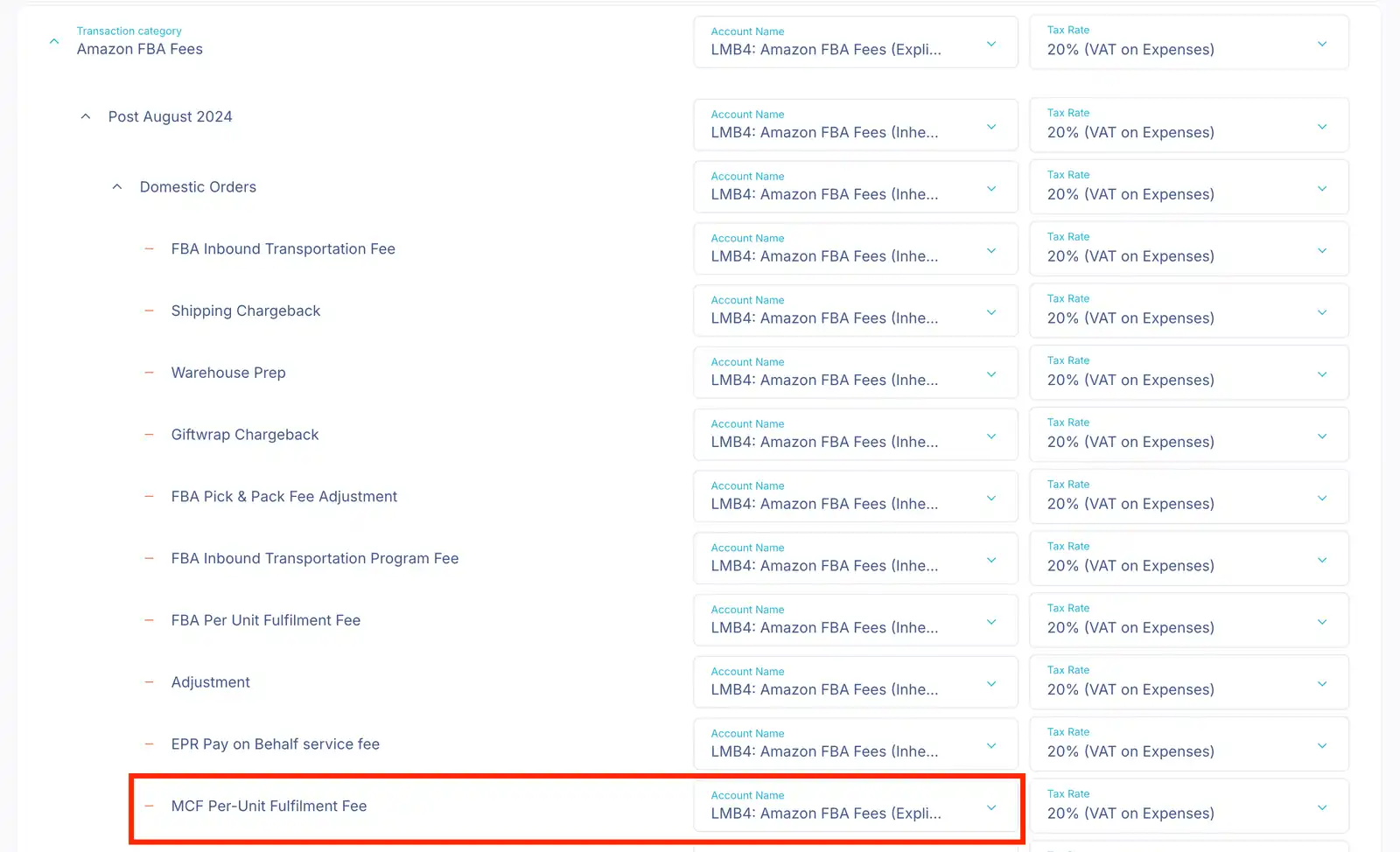
When you switch the add-on on, Link My Books pulls the MCF per-unit fulfilment fee out of your combined Amazon FBA fees and reports it on its own line in every settlement:
Amazon FBA Fees - MCF Per-Unit Fulfilment Fee
You then map that line to whichever account you like in Xero or QuickBooks, in Accounts & Taxes > Account & Tax Mappings, exactly as you would any other fee line. Nothing else in your Amazon breakdown changes. Sales, refunds, advertising, storage and your ordinary FBA fees all carry on as before.
That last point matters. We already offer a feature that splits your whole Amazon breakdown by fulfilment type, which is the right choice if you want FBA, FBM and MCF separated everywhere. But many sellers only want the one line that is distorting their numbers, without doubling the number of accounts they map. The MCF Fee Split add-on gives you that.
Pricing
The add-on is charged monthly on top of your plan:
- £15 per month (GBP)
- $20 per month (USD)
- A$30 per month (AUD)
You see the price on a confirmation screen before anything is charged. If you turn it off again, the charge stops and you are credited for the unused part of the month. If you pay annually, the add-on runs as a separate monthly subscription alongside your annual plan.
Who can turn it on
Only the account owner can enable or disable the add-on, because it adds a charge to the subscription. Once it is on, Admin, Accountant and Owner roles can all set the account mapping. You also need an active paid subscription; it is not available on trial.
Three things to know before you enable it
Settlements you have already sent are not changed. The split applies to settlements that have not yet been sent to Xero or QuickBooks. If you want it on earlier periods, roll those settlements back and re-send them using the Rollback feature.
The new line follows your FBA fees account until you map it. Switching the add-on on creates the line. Until you give it its own account in your mappings, it keeps posting wherever Amazon FBA Fees currently go. Nothing breaks, but you will not see the split until the mapping is set.
Check your COGS setup. If you use the Link My Books Cost of Goods Sold feature and also post COGS from Shopify, make sure you are not counting the stock twice on MCF orders. Our COGS guide explains how to avoid this.
Frequently asked questions
Does this split FBA and FBM as well?
No. This add-on only separates the MCF per-unit fulfilment fee. For a full FBA/FBM/MCF split across sales, refunds, tax and fees, use the Split by Fulfilment Type feature instead.
I have more than one Amazon account. Is it charged per account?
Yes. Each Amazon account is charged separately.
What if I do not use MCF?
You will not see the toggle offered, and there is nothing to enable. The add-on is only useful if Amazon is fulfilling orders from your other channels.
Can I try it and turn it off?
Yes. Turn it off at any time and the charge is removed, with a credit for the unused part of the month.
How to enable the MCF Fee Split add-on
If you are the account owner, it takes under a minute:
- In Link My Books, go to Settings > Settlement Settings > Transaction Grouping.
- Find Split MCF Fulfilment Fee and switch it on.
- Confirm the price on the screen that appears.
- Go to Accounts & Taxes > Account & Tax Mappings and map Amazon FBA Fees - MCF Per-Unit Fulfilment Fee to its own account.
.webp)
For the full walkthrough with screenshots, see Separate the Amazon MCF Per-Unit Fulfilment Fee into its Own Account in our help centre.
Not the account owner? Send them this post and ask them to switch it on. You can set the mapping yourself afterwards if you have an Admin or Accountant role.
Stop guessing what MCF costs you
Every month the fee stays bundled is another month your channel margins are off and your accountant is doing without a number they need. If Amazon is shipping your off-Amazon orders, turn the split on and see what MCF is really costing you from your next settlement.
Not yet using Link My Books? Start your free trial and connect Amazon, Shopify, eBay, Etsy, TikTok Shop and Walmart to Xero or QuickBooks in minutes.









.png)