



It is the third working day of the month. Sales are posted, fees are allocated, VAT looks right, and the only thing standing between you and a closed period is a PayPal clearing account with a balance that will not go away. It was £1,840 last month. It is £2,600 this month. Nobody can say exactly what is in it.If you take PayPal payments in more than one currency, that balance is not a mistake you made. It is what happens when a single clearing account is asked to hold GBP, EUR and USD at the same time, while PayPal reports and pays each of those currencies out separately. The numbers can never line up, so every month-end turns into an investigation.This post explains why that happens, what it costs you at month-end, and how giving each currency its own clearing account turns the slowest part of your close into a five-minute job.
Key Takeaways from this Post
PayPal holds, reports and pays out each currency separately, so one clearing account for all PayPal sales can never reconcile cleanly against your PayPal feeds.
A clearing balance that grows every month is a sign of hidden exchange differences and mismatched settlements, not a bookkeeping error, and it gets more expensive to untangle the longer it is left.
One clearing account per currency, created automatically by Link My Books, means each PayPal feed matches its own account, bank rules do the allocation, and the balances clear to zero at month-end.







What a clearing account is supposed to do
A clearing account is a holding area. When Link My Books posts your monthly PayPal settlement to Xero or QuickBooks, the sales, refunds and fees go to their proper accounts, and the net amount PayPal owes you goes to the clearing account. When PayPal pays that money out to your bank, you allocate the withdrawal against the same clearing account, and the balance returns to zero.
That is the whole job. Money in from the settlement, money out to the bank, zero at the end. When it works, reconciling PayPal takes a few minutes a month. Our guide to reconciling Shopify sales paid via PayPal walks through it step by step.
Where it breaks: PayPal is several accounts, not one
The moment you accept a second currency, PayPal stops behaving like one account. Each currency gets its own balance, its own activity report and its own payout schedule. Your EUR sales sit in a EUR balance until you withdraw them, and when you connect PayPal to Xero or QuickBooks, each currency arrives as its own bank feed.
Link My Books already creates a separate settlement for each currency. The problem was where those settlements landed. By default they all posted to one clearing account, so a single account was receiving GBP, EUR and USD settlements while three separate PayPal feeds were trying to clear against it.
Why the balance never reaches zero
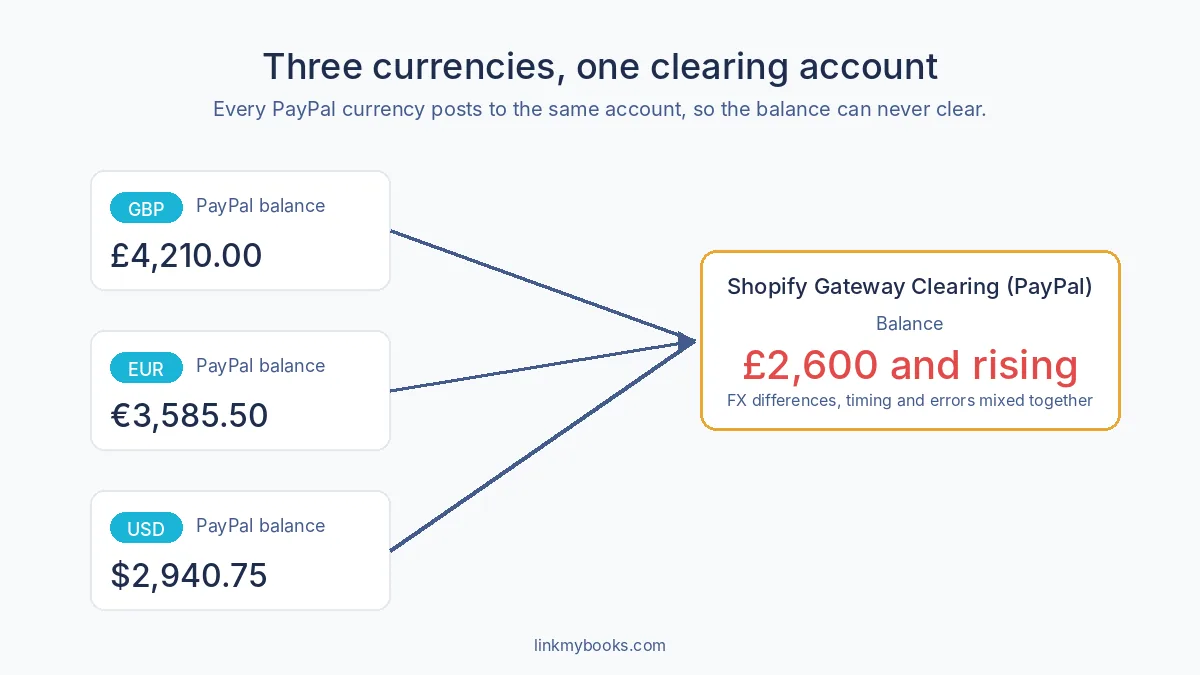
Put three currencies through one account and three things go wrong at once.
Exchange differences hide inside the balance. A EUR settlement is converted to your home currency on the day it is posted. The EUR withdrawal is converted on the day it lands in your bank. The two rates are never quite the same, and the difference stays in the clearing account with nothing to explain it.
Receipts and settlements stop matching. Your EUR PayPal feed shows a EUR 4,200 withdrawal. The clearing account shows a mix of GBP, EUR and USD settlements at converted values. There is no single line to match it to, so you allocate it to the account and hope the total works out.
Timing differences become invisible. In a single-currency account, a leftover balance is usually one order paid at the end of the month and settled in the next. With several currencies mixed in, you cannot tell a timing difference from an FX difference from a genuine error, so every month you inherit last month's question plus a new one.
The result is the balance you recognise: positive, growing, and impossible to clear without a spreadsheet.
What it costs at month-end
The hours are the obvious cost. Sellers and bookkeepers we speak to describe spending a full afternoon each month downloading PayPal reports per currency, building a reconciliation in a spreadsheet, and posting a manual journal to force the clearing account back to zero. Some gave up on the account altogether and built their own per-currency asset accounts in Xero, then recoded Link My Books journals by hand every month.
The bigger cost is what it does to the close. A clearing account you cannot explain is an open item, and an open item means you cannot sign off the month with confidence. Reporting slips, VAT returns get filed with a question mark against them, and your accountant spends their time on reconciliation instead of advice. Our Ecommerce Seller's Guide to Month-End Close makes the point that a close is only as fast as its slowest reconciliation. For most multi-currency sellers, PayPal is that reconciliation.
The fix: one clearing account per currency
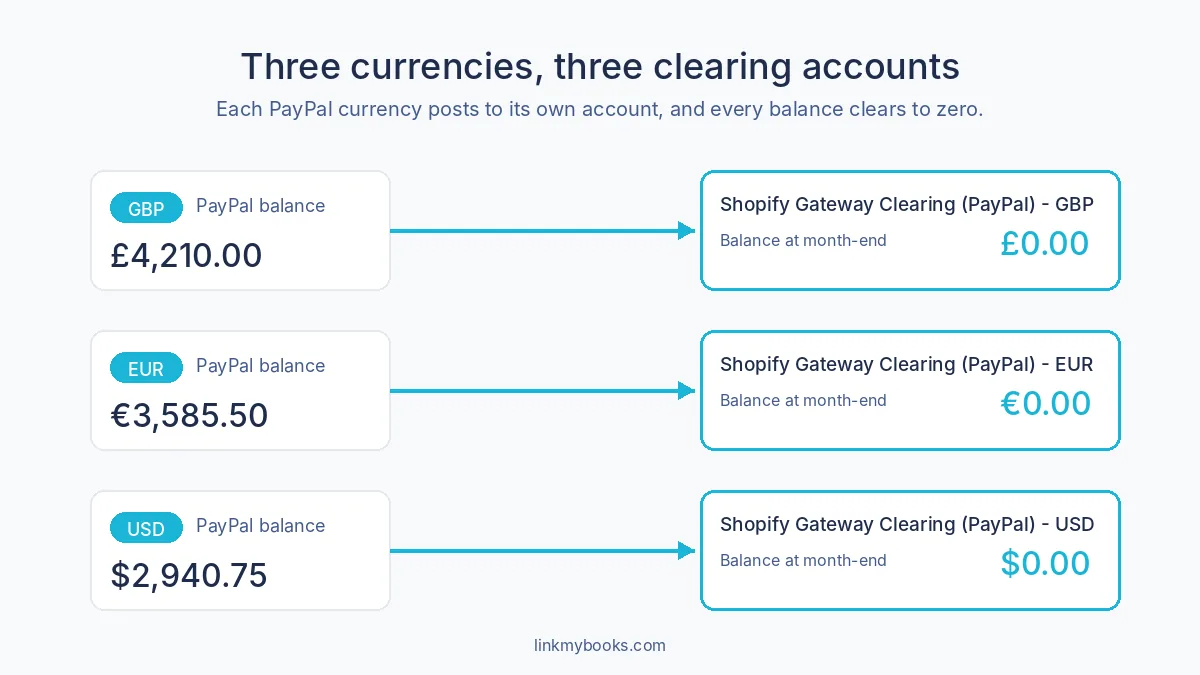
The answer is simple once you see it. If PayPal keeps a separate balance for every currency, your books should too.
Multi-Currency Clearing Accounts does exactly that. Switch it on and Link My Books creates a clearing account for each currency you take, in Xero or QuickBooks, named so you cannot mix them up:
- Shopify Gateway Clearing (PayPal) - GBP
- Shopify Gateway Clearing (PayPal) - EUR
- Shopify Gateway Clearing (PayPal) - USD
From then on, every settlement posts to the account for its currency. Your EUR PayPal feed clears against the EUR account, your USD feed against the USD account, and each one goes back to zero every month. Exchange differences surface where they belong, in your realised currency gains and losses, not buried in a clearing balance. The same split applies to Stripe, Klarna and any other gateway on the connection.
What month-end looks like afterwards
Because each PayPal feed now maps to one account, you can set up a bank rule per currency in Xero or QuickBooks and let it do the allocation. Our guides to bank rules in Xero and bank rules in QuickBooks show the pattern; you create the same rule once for each currency account.
How to switch it on
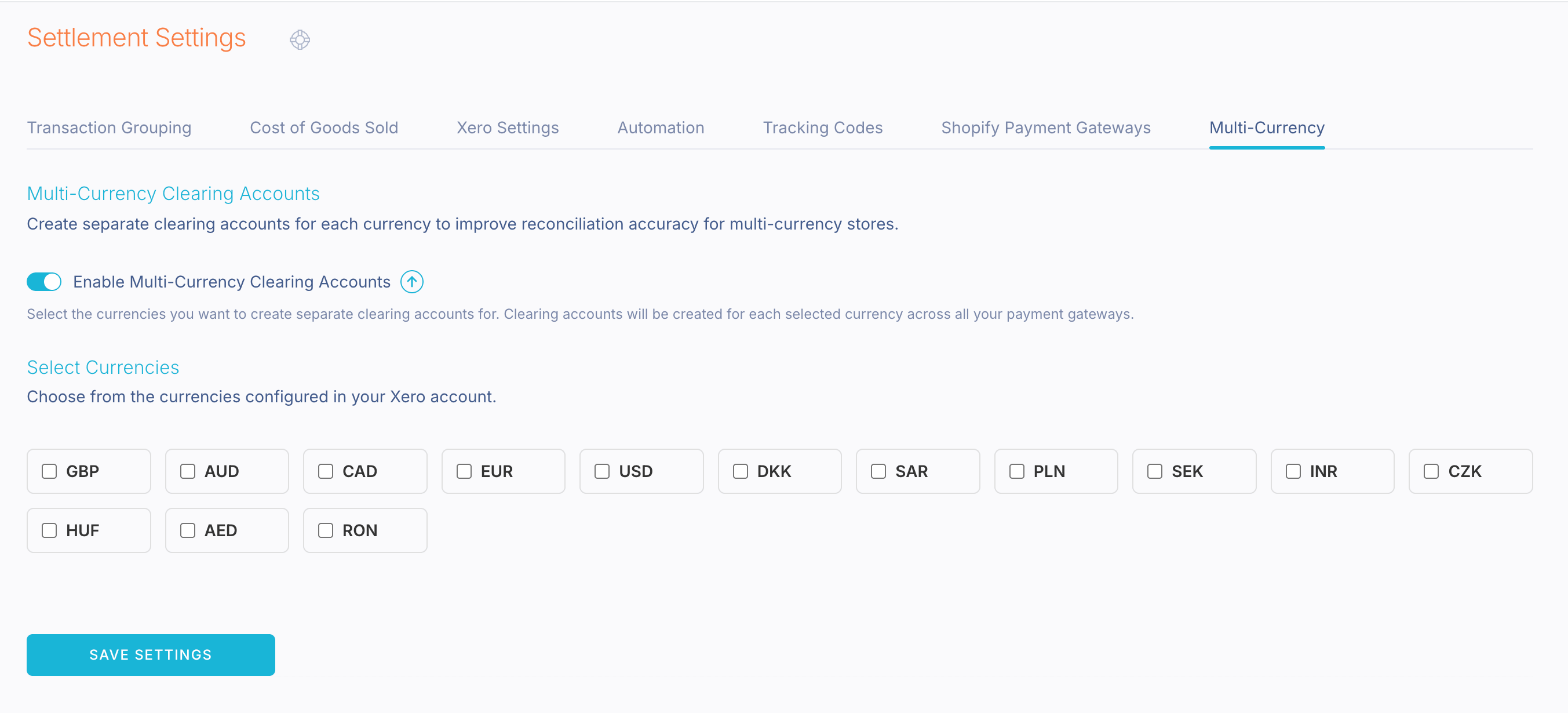
Multi-Currency Clearing Accounts is a Link My Books add-on at £15 a month, enabled by the account owner in a couple of minutes:
- Go to Settings > Settlement Settings and open the Clearing Accounts tab.
- Switch on Enable Multi-Currency Clearing Accounts and confirm the add-on.
- Tick the currencies you receive and click Save Settings.
Link My Books creates the accounts, refreshes any settlements you have not yet sent, and leaves everything already posted untouched. Full details, including what to do with the balance in your old clearing account, are in our help article: PayPal Multi-Currency Clearing Accounts: how it works and how to enable it (link once published).
Two things to check first: multi-currency must be enabled in your Xero or QuickBooks organisation with each currency added, and the PayPal gateway must be toggled on in Link My Books.
Is £15 a month worth it?
If you take PayPal payments in one currency, no. A single clearing account already does the job. If you take two or more, compare £15 with the afternoon you or your bookkeeper spend each month on a reconciliation that still ends in a manual journal. Most sellers find the add-on pays for itself in the first month, and the real return is a close you can sign off on day three instead of day ten.
Frequently asked questions
Does this only work for PayPal? No. It applies to every payment gateway on your Shopify or WooCommerce connection, so Stripe, Klarna and Clearpay taking several currencies get their own per-currency accounts too.
What happens to the balance already in my clearing account? It stays where it is. Settlements posted before you switched on the add-on remain in the original account, so clear that balance in the normal way. New settlements go to the per-currency accounts.
Do I need a multi-currency plan in Xero or QuickBooks? Yes. The currencies you can select come from your accounting software, so each one needs to be added there first.
Can my accountant switch it on for me? Only the account owner on a paid plan can enable an add-on. Your accountant can tell you it is needed; you flip the switch.
Selling in more than one currency through PayPal? Switch on Multi-Currency Clearing Accounts in Settlement Settings, or start a free trial of Link My Books and see your next month-end close in minutes, not afternoons.



.webp)





.png)