It's month end. You're a seller, and you want to know which of last month's Amazon settlements still haven't reached Xero. Or you're an accountant with a dozen ecommerce clients, and you want to know which of them have a settlement that failed to send this month.
Until now, that meant clicking through the dashboard, account by account. Now you can just ask.
Today we're opening the beta of Link My Books for AI assistants. Connect Claude or ChatGPT to your Link My Books account and ask about your sales, payouts and settlements in plain English. It's open to every Link My Books customer and accountant, and setup takes about two minutes.
Key Takeaways from this Post
Ask your books in plain English. Connect Claude or ChatGPT to Link My Books and ask about settlements, payouts, mappings and product costs. Answers come from your real account data.
You stay in control. It's read-only unless you allow more. You choose what it can change, you can ask to approve each change first, and rolling back a settlement always needs your yes.
Built for sellers and accountants. One connection reaches every client account an accountant can access, and setup takes about two minutes.







What it is, in plain English
AI assistants like Claude and ChatGPT are good at answering questions. On their own, though, they know nothing about your business. Ask one about your settlements and the best it can do is guess.
Link My Books for AI assistants fixes that. Once you connect it, the assistant can look up the answer in your Link My Books account, so its reply is based on your real data rather than a guess.
It's built on MCP (Model Context Protocol), an open standard that AI assistants use to connect to other apps. You don't need to know anything about MCP to use it. You just paste one address into Claude or ChatGPT and sign in.
What you can ask
Use your own words. Here are some ideas to start with.
Month-end checks
- "Show my last five settlements for my Amazon UK account."
- "Did any settlements fail to send to Xero last month?"
- "Compare my latest Shopify payout with the one before. What changed?"
- "Have any of my clients using COGS got any missing product costs?"
Housekeeping
- "Which categories aren't mapped to an account code yet?"
- "List my products that have no cost set."
- "Are all my zero rated SKUs (starting with ZR) assigned to the Zero Rated Products group?"
Getting things done (only if you've given permission, as explained below)
- "Set the cost of SKU ABC-123 to 4.50."
- "Map Amazon FBA fees to account 6100."
- "Send my latest Amazon settlement to Xero."
- "Map all discounts to my new Product Discounts account."
Tip: if you have more than one account, say which one you mean.
You stay in control
We know your books aren't something to experiment with. So the beta is built around one principle: the assistant can only do what you allow.
It's read-only unless you choose otherwise. When you connect, Link My Books asks what the assistant is allowed to do. Reading your data is always on. Everything else is off until you tick it:
- Refresh settlements. This only recalculates figures inside Link My Books, not in your accounting software.
- Change your product costs
- Change which category specific transaction types are mapped to
- Change which tax rate is applied to specific types of transactions
- Send settlements to Xero or QuickBooks
- Void (roll back) settlements already in Xero or QuickBooks
Ask to see changes first. Before anything changes, Link My Books gives the assistant a preview: the old value, the new value and which records are affected. Once you've given permission and asked for a change, such as new product costs, the assistant may go ahead without checking back with you. If you'd rather approve each change yourself, say so in your message, for example: "Show me the changes first and wait for my OK."
Rollbacks always need your yes. Before cancelling a settlement in Xero or QuickBooks, the assistant must show you exactly which invoices will be cancelled and wait for you to confirm in the chat. Read that preview carefully, because a rollback can't be undone.
It has the same access as you, never more. The assistant uses your Link My Books login, so it can only reach accounts you can open yourself. If you can only view an account, so can the assistant. Claude and ChatGPT never see your Link My Books password.
Your customers' personal details stay private. We replace end-customer personal details with stand-ins before they reach the assistant, so your customers' names and addresses never land in your AI chats.
You can disconnect at any time. In Link My Books, go to Settings → Connected applications, click Action next to the assistant and disconnect it. Access stops straight away.
One thing worth knowing: anything the assistant reads appears in your chat, and your chats are held by the assistant's provider under Anthropic's or OpenAI's privacy terms.
Built for sellers and accountants
For sellers
You don't need to learn where everything lives in the dashboard. Questions like "Is everything from last month in Xero?" or "Which products are missing a cost?" take one sentence, and you get a straight answer. When something needs fixing, the assistant can fix it for you if you've given it permission. Ask it to show you the change first if you want to check it.
For accountants and bookkeepers
This is where it really adds up. One connection reaches every client account you can access in Link My Books, so you don't need to connect each client separately. Just name the client in your question:
- "Which Link My Books accounts can you see?"
- "For [client], which settlements haven't been sent to Xero yet?"
- "Which categories are still unmapped on [client]'s Amazon account?"
Your access works exactly as it does in Link My Books. Your role on each client account carries over, and if a team member only has view access, their assistant only gets view access too.
Four real examples, start to finish
Seller: filling in missing product costs
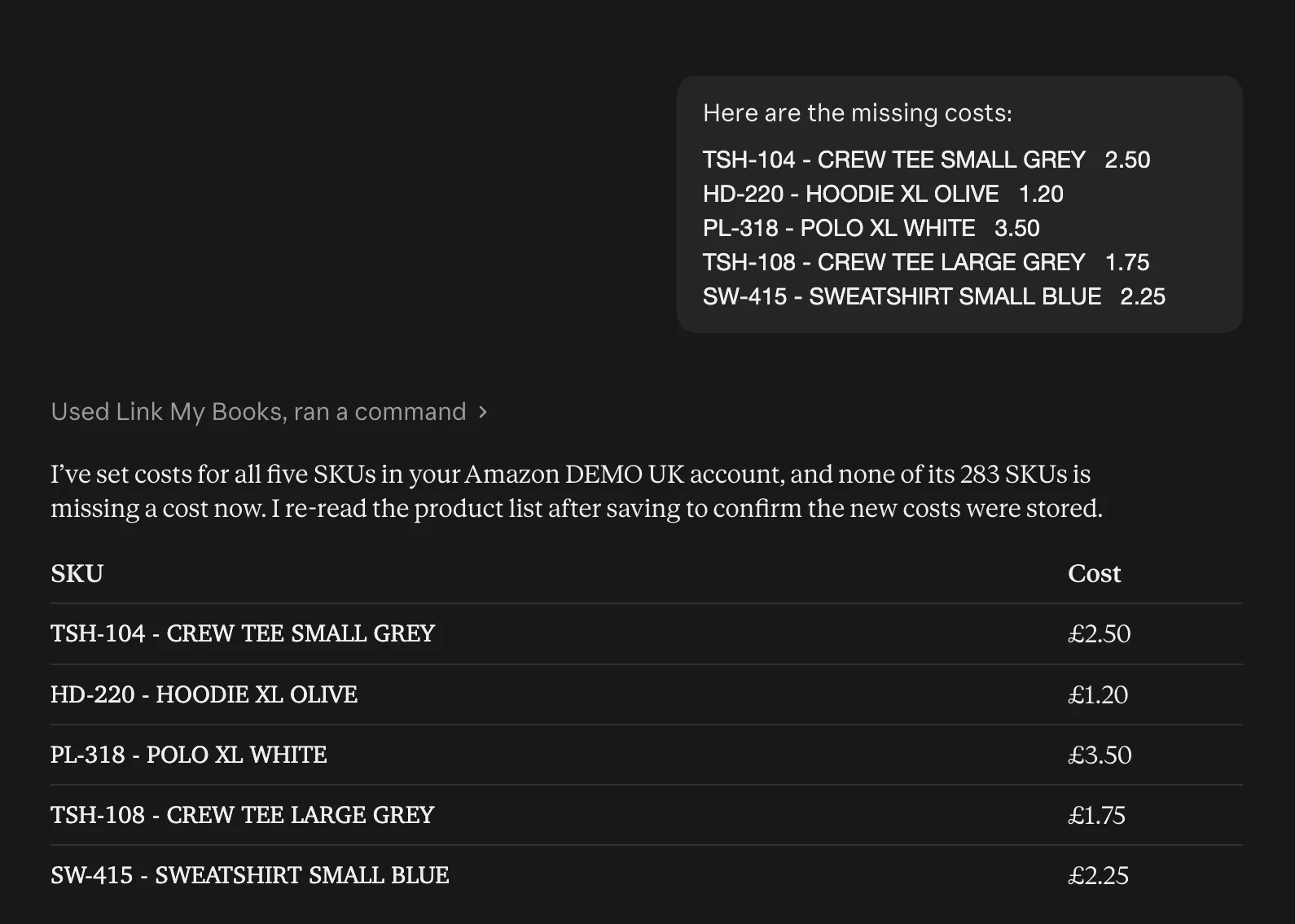
The problem. You launched 5 new products last month and you want to update those costs in Link My Books.
Doing it by hand. You'd go through your product list to find the ones with no cost, look each one up in your supplier's price list, and type the costs in one at a time. If you also want shipping and import duty included in the cost, you work that out by hand first.
With your assistant. Ask "Which of my products on my Amazon account don't have a cost set yet?" and you get the list. Then paste in the costs from your supplier's price list:
Or attach your whole price list as a spreadsheet and say how you want the cost worked out, for example "include shipping and duty in the landed cost". The assistant matches each line to the right product, works out the cost and saves it:
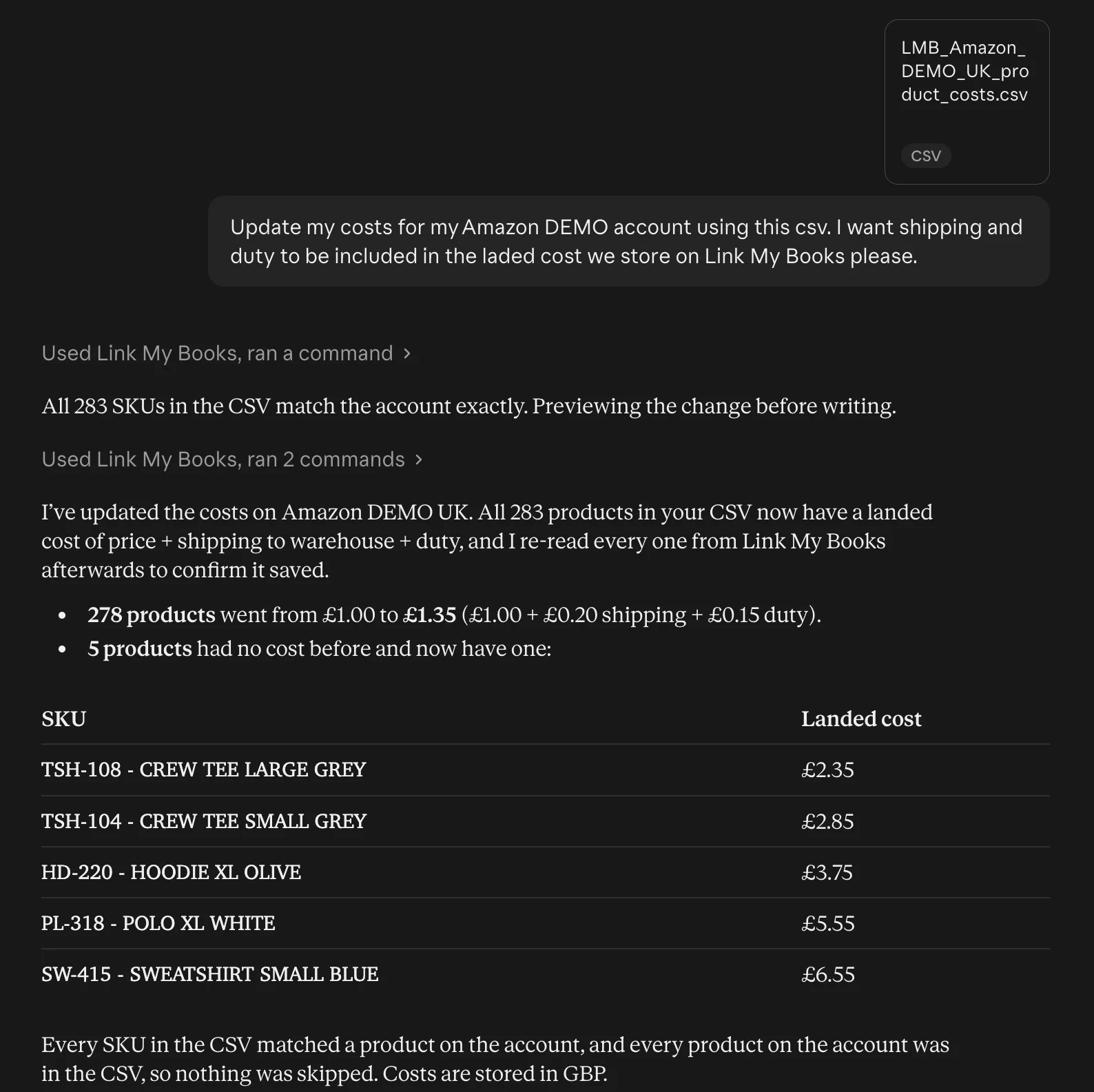
Tip: a price list can overwrite costs you've already set. If you want to check the changes before they're saved, add "show me the changes first" to your message.
The result. Every product has a cost, with shipping and duty included if you asked for them. Your cost of goods is right before you look at your margins, and you didn't type in a single figure. (Needs the "change your product costs" permission.)
Seller: fixing a mistake that's already in Xero
The problem. You notice that a settlement you've already sent to Xero put a fee in the wrong account.
Doing it by hand. You'd cancel (roll back) the settlement in Link My Books, fix the category mapping, update the settlement and send it again. That means four steps on different screens, and you need to know where each one is.
With your assistant. Describe the problem: "My settlement from [dates] went to Xero with FBA fees posted to the wrong account. They should go to [account]. Can you fix it and resend it?" The assistant works through each step. Before the rollback, it shows you exactly which invoices will be cancelled in Xero and waits for your yes, because a rollback can't be undone. It then fixes the mapping and sends the corrected settlement.
The result. Fixed in one conversation, without hunting for the right screens. (Needs the rollback, category and send permissions.)
Accountant: Monday-morning check across every client
The problem. You look after a dozen or more ecommerce clients and want to know which of them have a settlement that failed to reach Xero or QuickBooks, or hasn't been sent yet.
Doing it by hand. You'd open each client's account in turn and scan their settlements. That's fine for three clients and a real chore for twenty.
With your assistant. Ask once: "Check all my client accounts: which ones have settlements that failed to send to Xero or QuickBooks, or haven't been sent yet this month? Group the answer by client." One connection already covers every client you can access in Link My Books, so the assistant checks them all and gives you one list.
The result. You start the week knowing exactly which clients need attention, and you spend your time on those rather than on the ones that are fine.
Accountant: health check on a new client
The problem. You've taken on a new client whose Link My Books setup was done by someone else, and you don't yet know how much you can trust it.
Doing it by hand. You'd go through every category mapping and tax rate and compare them with the client's chart of accounts, then check their product list for missing costs. It's careful, slow work, and easy to put off until VAT time shows up the problems.
With your assistant. Ask: "Give me a health check of [client]'s Link My Books setup: categories not mapped to an account code, tax rates that look inconsistent, and products missing a cost. Finish with a short to-do list." The assistant reads their mappings, tax rates and products and turns what it finds into a to-do list. It can fix the unmapped categories for you too. Ask it to show you the changes first if you want to check them.
The result. On day one you have a clear clean-up list, instead of surprises at the next VAT return. (The health check only reads. Fixing things needs the matching permissions.)
Get started in two minutes
You'll need your Link My Books login and either:
- Claude on any plan, including Free, in a web browser or the desktop app, or
- ChatGPT on a paid plan such as Plus, in a web browser.
Then:
- Add a custom connector in Claude, or a custom MCP server in ChatGPT.
- Paste this address:
https://mcp.linkmybooks.com/mcp - Sign in to Link My Books, tick any permissions you want to give, accept the beta terms and click Allow.
- Start a new chat and ask: "Which Link My Books accounts can you see?"
Step-by-step guides with screenshots:
- How to connect Claude to Link My Books
- How to connect ChatGPT to Link My Books
- Using Link My Books with Claude or ChatGPT, covering things to ask, permissions and troubleshooting
Why it's a beta, and what's next
This is new for us and new for our customers, so we're starting carefully. The assistant is read-only by default, you decide exactly what it can touch, and rolling back a settlement always needs your yes.
The beta is open to everyone, and what we add next will be shaped by how you use it. Tell us what you ask, what works, and what you wish it could do. Message us from the chat in the Link My Books app and let us know which assistant you're using.
Ready to try it? Connect your AI assistant →
Where we fit in
Link My Books posts your sales from Amazon, Shopify, eBay, Etsy, TikTok Shop, Walmart, WooCommerce or Square into Xero or QuickBooks, reconciled to the bank deposit. Now you can ask about all of it in plain English.
Not using Link My Books yet? Start your free trial and connect your assistant on day one.
Accountant or bookkeeper? Book a demo and we'll show you how it works across your client accounts.
Frequently asked questions
Which AI assistants work with Link My Books?
Claude and ChatGPT. Claude works on any plan, including the Free plan (which allows one custom connector), in a web browser or the desktop app. ChatGPT needs a paid plan such as Plus, used in a web browser.
Can the AI assistant change my books without asking?
Only if you've allowed it. It's read-only unless you tick extra permissions when you connect. Once you have, it can make the changes you ask for, such as updating product costs, without a separate confirmation step. If you'd like to approve each change first, say so in your message and it'll show you the old and new values before going ahead. Rolling back a settlement in Xero or QuickBooks always needs your yes, because it can't be undone.
Can accountants use it with their client accounts?
Yes. One connection reaches every client account you can access in Link My Books. Your role on each account carries over, so view-only access stays view-only.
Does Claude or ChatGPT see my Link My Books password?
No. You sign in to Link My Books directly and choose what the assistant may do. Claude and ChatGPT never see your password.
How do I change permissions or disconnect?
In Link My Books, go to Settings → Connected applications, click Action next to the assistant and disconnect it. Access stops straight away. To change permissions, disconnect and connect again, ticking the permissions you want.