


This article provides general information only and does not constitute tax advice. For advice on your specific situation, speak with a qualified accountant or HMRC.
There is no new side hustle tax for Etsy sellers. HMRC did not introduce a new tax rule for selling online. HMRC and other tax authorities now receive more sales data from platforms, so it’s easier to cross-check what sellers report.
If your Etsy activity counts as trading and your gross trading income goes over £1,000 in a tax year, you may need to register for Self Assessment and declare it.
Key Takeaways from this Post
Etsy reporting rules and HMRC filing rules are not the same thing, and that mismatch causes most of the panic.
Etsy may report your activity if you hit platform thresholds, even if you end up owing little or no tax once you subtract fees and expenses.
If you want clean numbers you can trust at month-end, Link My Books automates Etsy sales, fees, refunds, and taxes and posts tidy summaries into Xero or QuickBooks so reconciliation stops living in spreadsheets.







2026 Update: The “Side Hustle Tax” Headlines vs the Real Change
With the number of sellers on Etsy still rising, many are confused about the side hustle tax, but HMRC has been explicit - there is no new tax for online selling. The change is reporting. Digital platforms must share sales data and some personal information with HMRC, and the first reporting cycle covered sales activity from 2025.
You can find easy-to-use guides for side hustlers at the Tax Help for Hustles campaign page.
What triggers Etsy reporting to HMRC?
If you’re a UK seller, Etsy says it must send your information to HMRC when you meet any of the following:
- 30 or more transactions (physical goods) in a calendar year:
- €2,000 or more in physical goods sales after taxes and fees in a calendar year:
- Any sales of made-to-order digital items in a calendar year:
- Lower thresholds for some mid-year onboarded sellers (example Etsy gives: €1,000 or 15 transactions if you onboarded July 1, 2024):
What Etsy reports (and why your “reported amount” can look odd)
Etsy reports identity details (name, address, date of birth, bank account number, VAT/TIN details where available) plus transaction totals by quarter. Etsy also explains that the “total amount paid” reflects gross sales minus refunds, fees, and Etsy-remitted taxes, and it separately reports fees and taxes withheld or charged.
Platform reporting threshold vs tax filing threshold (they are different)
Here’s the split that matters most:
Do You Have to Declare All Etsy Income to HMRC?
Not automatically. Etsy reporting does not automatically mean you owe tax or even need to file. HMRC says you may need to register for Self Assessment if you are trading (for example, buying goods for resale or making goods to sell for profit) and your total income from trading or services goes over £1,000 before expenses in a tax year.
The £1,000 trading allowance (what it actually means)
HMRC’s trading allowance can cover up to £1,000 of gross trading income. If your gross trading income is £1,000 or less, you may not have to tell HMRC, but you still need to keep records.
If your gross trading income is over £1,000, you typically need to declare it. You can either:
- Claim the trading allowance instead of expenses (when expenses are low):
- Claim your actual allowable expenses instead of the allowance (when expenses are higher)
Selling personal items vs trading for profit
HMRC draws a clear line between occasional selling of unwanted personal items and trading. If you sell personal items, the rules have not changed. If you buy or make goods with the intention of selling for profit, that looks like trading and can create a filing obligation once you cross thresholds.
Revenue vs profit (why this trips Etsy sellers up)
HMRC taxes profit (after allowable costs), not the headline sales number you see in a dashboard. Etsy reporting can still help HMRC spot missing income, but it does not automatically prove your taxable profit.
Why HMRC Updated Reporting for Private Etsy Sellers
This update exists for one simple reason: tax authorities can match platform data against Self Assessment reporting more easily than before. HMRC describes this as a reporting change, not a new tax rule.
Here’s what it changes in practice:
- Faster discrepancy detection: HMRC can compare reported trading income with platform totals.
- More consistent compliance signals: repeated online selling looks more “business-like” when platforms report totals.
- Less confusion long-term (once sellers separate reporting thresholds from tax thresholds): HMRC has published guidance specifically to address misinformation.
What to Do If You’ve Received an HMRC Etsy Letter
First: treat it seriously, but do not panic.
Step 1: Verify the letter is genuine
- Use HMRC’s “check if a letter is genuine” tool, which lists real letters and gets updated regularly.
- If the letter includes a QR code, HMRC also has a dedicated “check if a QR code is genuine” page.
Step 2: Match the letter to your Etsy reality
Work through this checklist:
- Confirm if Etsy reported you: check Etsy emails and your tax settings prompts.
- Pull your Etsy totals: sales, refunds, fees, and any taxes Etsy collected or charged.
- Decide if you are “trading”: use badges of trade (covered below).
Step 3: If you should have filed, act fast
You can still register, file, and pay. Late penalties exist, but early action limits the damage.
How Link My Books Simplifies Etsy Tax Filing
If you want the low-stress route to HMRC compliance, start by fixing your messy Etsy bookkeeping. HMRC reporting makes it easier to spot mismatches. When your Etsy totals do not tie out to your bank deposits, you waste hours proving what happened.
Link My Books connects Etsy to Xero or QuickBooks and posts clean, bank-matched summaries so your books stay consistent from day one.
What Link My Books Automates for Etsy Sellers
- Payout reconciliation that actually matches your bank: Link My Books breaks each Etsy payout into sales, refunds, fees, and taxes, then posts a summary entry that matches the deposit so reconciliation becomes a one-click job.
- Automatic posting options: Use manual sync when you want control, or switch on AutoPost so new settlements post to Xero or QuickBooks automatically from a chosen start date.
- Clean fee and refund separation: Keep Etsy fees, payment processing, and refunds out of “sales” so your profit does not look inflated when you prep for Self Assessment.
- Accurate tax handling inputs: Set your account and tax rate preferences during setup so Link My Books can apply consistent treatment as data flows into Xero or QuickBooks.
- Multi-currency support when needed: Link My Books can send settlements to Xero in the original foreign currency (your Xero plan needs multi-currency enabled).
- COGS visibility for real margins: Track cost of goods sold so you can see true profitability, not just revenue.
- Financial analytics and benchmarking: See profitability and ecommerce KPIs, then benchmark performance against similar businesses so you know if your margin problem is “you” or the market.
- Help when setup feels daunting: You can pull your accountant in, and you can also get support during setup when mapping and tax settings feel unfamiliar.
Setup Takes About 15 Minutes
Link My Books connects Etsy directly to your accounting software and does the heavy lifting for you.
In just a few clicks, it pulls your Etsy sales, refunds, fees, and taxes into QuickBooks Online or Xero, applies the correct VAT or sales tax rules, and posts everything in clean, categorized summaries. Each payout in your books matches your bank feed exactly - ready for one-click reconciliation.
Here’s how it works:
Step 1: Connect Your Accounts
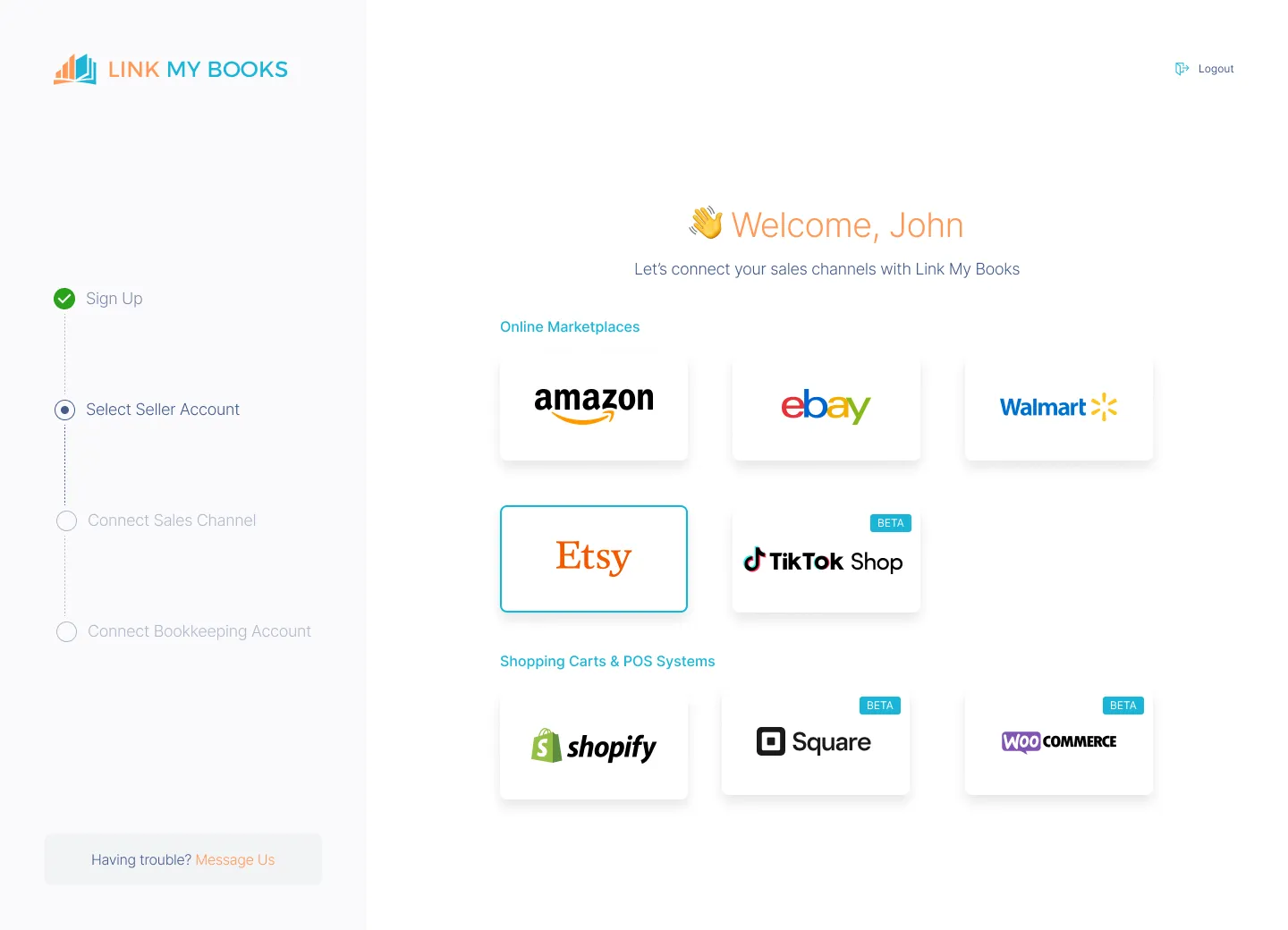
- Connect Etsy to Xero or QuickBooks via Link My Books.
- This integration ensures seamless data flow between the platforms.
- Authorize access, and Link My Books will begin importing your recent Etsy payouts.
Step 2: Configure Your Tax Settings
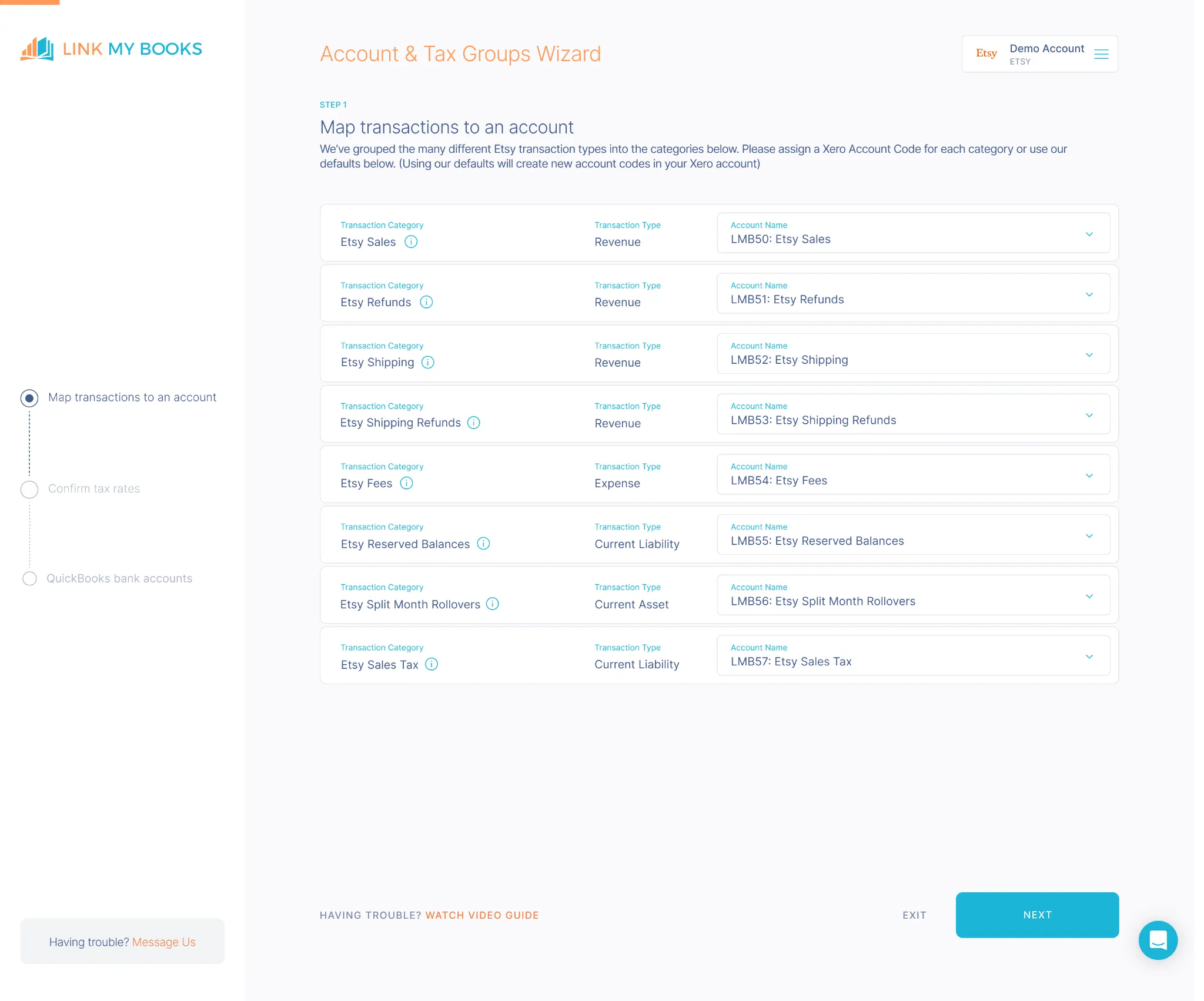
- Use the guided tax wizard to set up VAT or sales tax preferences.
- Etsy’s Marketplace Facilitator taxes are automatically separated, so you never double-report.
- Whether you sell within the UK, EU, or US, Link My Books ensures each transaction is tagged with the correct tax code.
Step 3: Sync Your Payouts

- Link My Books automatically fetches all Etsy payout data - including sales, refunds, fees, and taxes - and organizes it into an easy-to-read summary.
- Each summary is mapped to your QuickBooks or Xero chart of accounts, so there’s no manual categorization required.
Step 4: Reconcile in One Click

- Each Etsy payout is summarized into a single entry that perfectly matches your bank feed.
- When you open your reconciliation screen, you’ll see every deposit ready to approve instantly - no spreadsheets, no manual matching.
Step 5: Review and Relax
Your books are accurate, VAT-compliant, and audit-ready.
You’ll always know exactly how much you’ve earned, what you’ve spent on fees, and how much tax has been collected or remitted.
✅ In under 15 minutes, Link My Books turns messy Etsy data into clean, compliant accounts.
👉 Start your free trial today and simplify your Etsy accounting in minutes.
Why This Helps When HMRC Questions Your Etsy Numbers
When you receive an HMRC letter, you need a clean story that ties together: Etsy activity, fees and refunds, and the money that hit your bank.
Link My Books helps because it gives you:
- A consistent audit trail: Settlement-style summaries that mirror payouts and reconcile to deposits.
- Cleaner Self Assessment prep: Sales and fees stay separated, so you calculate profit faster and with fewer “wait, what is this line?” moments.
- Better tax confidence: Your accounting software receives structured entries with consistent tax settings, instead of ad hoc spreadsheet uploads.
👉Start a free 14-day trial and let Link My Books handle your payout reconciliation on autopilot.
How to File Your Etsy Taxes to HMRC
If you want to do it manually, pick the route that matches your situation:
- Route 1: Self Assessment (DIY) - best if your records are clean and your Etsy activity stays simple.
- Route 2: Accountant or bookkeeper - best if VAT, high volume, or multiple income streams complicate things.
- Route 3: Preparing for Making Tax Digital - best if your income puts you into MTD soon.
If you’re not sure if you need to file a tax return, you can do a self-check here.
Step 1: Pull your Etsy numbers (gross and net)
You need these building blocks:
- Sales revenue
- Refunds and cancellations
- Etsy fees and commissions
- Shipping charged vs shipping costs
- Taxes collected or charged by Etsy (where relevant)
Step 2: Work out your taxable profit
Start with gross sales, then deduct allowable business costs such as:
- Materials and supplies
- Packaging and postage
- Etsy fees and payment processing
- Advertising and marketing spend
- A fair share of home office costs (if you genuinely use part of your home for the business)
If your expenses exceed £1,000, claiming actual expenses often beats claiming the trading allowance.
Step 3: Register and file on time
Key deadlines (example cycle shown on GOV.UK):
- Tell HMRC you need to file: by October 5 after the end of the relevant tax year.
- File online: by January 31.
- Pay what you owe: by January 31 (and sometimes July 31 for payments on account).
Step 4: Keep records that match how platforms report
Since platforms can report transaction totals and fees, keep records that let you explain:
- Why reported sales do not equal taxable profit
- Which expenses sit behind the profit number
- How refunds and fees reduced your net earnings
Step 5: Watch Making Tax Digital if you are growing
From April 6, 2026, Making Tax Digital for Income Tax applies to sole traders and landlords with qualifying income over £50,000 (with lower thresholds scheduled in later years).
What Happens If You Don’t Declare Etsy Earnings?
If you file late, HMRC applies late filing penalties. GOV.UK lists the typical structure, starting with a £100 penalty and escalating based on how late the return is.
If you pay late, HMRC can also apply late payment penalties and interest.
Not sure how to handle all that? Read our guide on how to do Ecommerce Accounting in 2026.
Key Taxes to Know for Etsy Sellers in the UK
Does Etsy send VAT to HMRC?
Sometimes, but not in the way most sellers assume.
- VAT on buyer orders (imports): Etsy says the UK requires it to collect and remit VAT on applicable physical goods shipped from outside the UK when the total package value is £135 or less.
- VAT on UK-to-UK sales: Etsy says it does not collect VAT when goods are located in the UK and the transaction is between a UK buyer and a UK seller. In that case, VAT-registered sellers handle VAT in the normal way.
- VAT on seller fees: Etsy says it may collect VAT on seller fees and remit it to the relevant tax authority depending on your status and location.
What Are HMRC’s Badges of Trade?
Badges of trade are the criteria HMRC uses to decide whether an activity counts as trading. They matter because trading status drives whether your Etsy income becomes taxable trading income.
In plain English, HMRC looks at signals like:
- Frequency: regular selling looks more like a business than a one-off clearout.
- Intent: buying or making items specifically to sell for profit looks like trading.
- How you operate: listing, marketing, fulfilling orders, and running it like a shop points toward trading.
FAQ on HMRC and Etsy
How do you know if your HMRC letter is genuine?
Use HMRC’s official “check if a letter is genuine” page. It lists recent letter types and gets updated frequently.
How much can you sell on Etsy without paying tax in 2026?
The simplest rule of thumb: if your gross trading income stays at £1,000 or less in a tax year, the trading allowance may cover it. If you go over £1,000, you may need to declare it, even if your profit ends up small after expenses.
Do I need to tell HMRC if I sell on Etsy?
If you sell occasionally and you are not trading, nothing changed. If you trade and your gross trading income goes over £1,000, you may need to register for Self Assessment and report it.
Does Etsy report seller info to HMRC?
Yes, when you meet the reporting criteria, Etsy says it must send seller info and transaction totals to HMRC.
Does Etsy handle VAT for sellers?
Etsy may collect and remit VAT in specific situations (like certain import scenarios) and may collect VAT on seller fees, but UK VAT-registered sellers still need correct VAT bookkeeping for their business.
Final Words on HMRC and Etsy Sellers

The risk for Etsy sellers in 2026 is not a new tax. The risk is messy records in a world where platforms can report your totals to HMRC. If you sell consistently, treat bookkeeping like part of the business, not an afterthought.
If you want fewer surprises at tax time, Link My Books gives you clean Etsy summaries in Xero or QuickBooks, faster payout reconciliation, and a clearer view of fees and taxes.
👉Start your free trial today and see how easy Etsy accounting can be!
Sources and Verification
Primary sources used (official):
- HMRC guidance on online seller reporting (no new tax, what changed, and the £1,000 trading trigger)
- Etsy help center (UK reporting thresholds, seller data fields, and quarterly financial data)
- HMRC Self Assessment deadlines and penalties
- HMRC badges of trade manual (summary)
- HMRC VAT registration threshold (£90,000) and registration guidance
- HMRC “check if a letter is genuine” anti-scam guidance (updated Feb. 4, 2026)
- Making Tax Digital start date and thresholds
Definitions used:
- Trading allowance: a tax-free allowance of up to £1,000 of gross trading income per tax year.
- Platform reporting thresholds: Etsy reporting triggers (30 transactions, €2,000, or made-to-order digital items, with reduced thresholds for some mid-year onboarded sellers).
Quick compliance checklist:
- Confirm whether Etsy reporting thresholds apply to you
- Separate “reported totals” from “taxable profit” using fees, refunds, and expenses
- If you need to file, meet the October 5 and January 31 deadlines
- If you get an HMRC letter, verify it before acting
Site note (address string update): The footer address line should match Companies House formatting: “Office F1 Tanfield Lea Business Centre, Tanfield Lea Industrial Estate North, Stanley, United Kingdom, DH9 9DB.”
Last verified: February 25, 2026.




.webp)





.png)