


Etsy transaction reports are essential for understanding your shop’s performance - but they’re also one of the most confusing parts of Etsy bookkeeping. Each payout includes a mix of sales, fees, refunds, and taxes, which makes it difficult to match what you see in Etsy with what lands in your bank account.
Most sellers try to fix this by downloading CSV files, sorting rows into endless spreadsheets, and manually reconciling totals in QuickBooks or Xero. It’s tedious, time-consuming, and prone to mistakes - especially when VAT or sales tax is involved.
That’s why smart Etsy sellers are turning to automation. Tools like Link My Books pull all your Etsy transactions into your accounting software automatically, categorizing every sale, refund, fee, and tax so your books are accurate and VAT-ready, without the spreadsheets.
In this guide, you’ll learn how to:
- Download and analyze your Etsy transaction report manually
- Understand what each key figure means for accounting and VAT
- Automate the process completely with Link My Books
By the end, you’ll know exactly how to get your Etsy transaction report, what to look for in it, and how to make bookkeeping effortless.
Key Takeaways from this Post
Etsy transaction reports combine multiple data points (including sales, refunds, fees, and VAT), which makes them difficult to interpret manually.
Manual reconciliation using spreadsheets takes hours and often leads to reporting errors, duplicate entries, or missed tax adjustments.
Link My Books automates the process by syncing Etsy transactions directly into QuickBooks or Xero, applying the correct VAT or sales tax rules automatically.







Where Most Sellers Go Wrong With Etsy Transaction Reports
Many Etsy sellers assume that downloading the platform’s transaction report once a month is enough to keep their books in order. Unfortunately, it’s rarely that simple. The Etsy payment system bundles everything (sales, refunds, fees, and taxes) into each payout. When you try to reconcile those payouts manually, it’s almost impossible to see the full picture of your income and expenses.
Here’s where most sellers run into trouble:
1. Treating Payouts as “Sales”
Etsy transfers only the net amount after subtracting fees, refunds, and sometimes VAT or sales tax. If you record this payout as sales income, you’ll overstate your revenue and distort your profit margins.
2. Missing Fee and Ad Spend Details
Etsy applies multiple fees - transaction fees, listing fees, and optional advertising costs. Many sellers forget to account for these separately, which leads to inaccurate cost tracking and reduced visibility on profitability.
3. Misreporting VAT or Sales Tax
Etsy now collects and remits VAT or sales tax in many regions under Marketplace Facilitator laws. Sellers who don’t separate these amounts in their reports risk double-counting tax in their accounting software.
4. Overlooking Refund Adjustments
Refunds can appear days after a sale or payout, often in a separate batch. Without detailed tracking, these reversals are easy to miss, leaving your reports inflated.
5. Ignoring Timing Differences
Etsy payouts don’t always align perfectly with your accounting periods. One payout might include several days of overlapping sales, creating mismatched totals in your books.
The end result? Inaccurate figures, unbalanced ledgers, and a serious risk of overpaying VAT or underreporting income.
Link My Books solves all of these issues automatically - pulling each Etsy payout into QuickBooks or Xero, separating every sale, fee, refund, and tax, and reconciling them with your bank feed to the cent.
How to Get an Etsy Transaction Report the Easy Way (With Link My Books)

The easiest way to access, understand, and reconcile your Etsy transaction report is to automate it. Instead of downloading CSVs and manually organizing your data, Link My Books connects Etsy directly to your accounting software and does the heavy lifting for you.
In just a few clicks, it pulls your Etsy sales, refunds, fees, and taxes into QuickBooks Online or Xero, applies the correct VAT or sales tax rules, and posts everything in clean, categorized summaries. Each payout in your books matches your bank feed exactly - ready for one-click reconciliation.
Here’s how it works:
Step 1: Connect Your Accounts
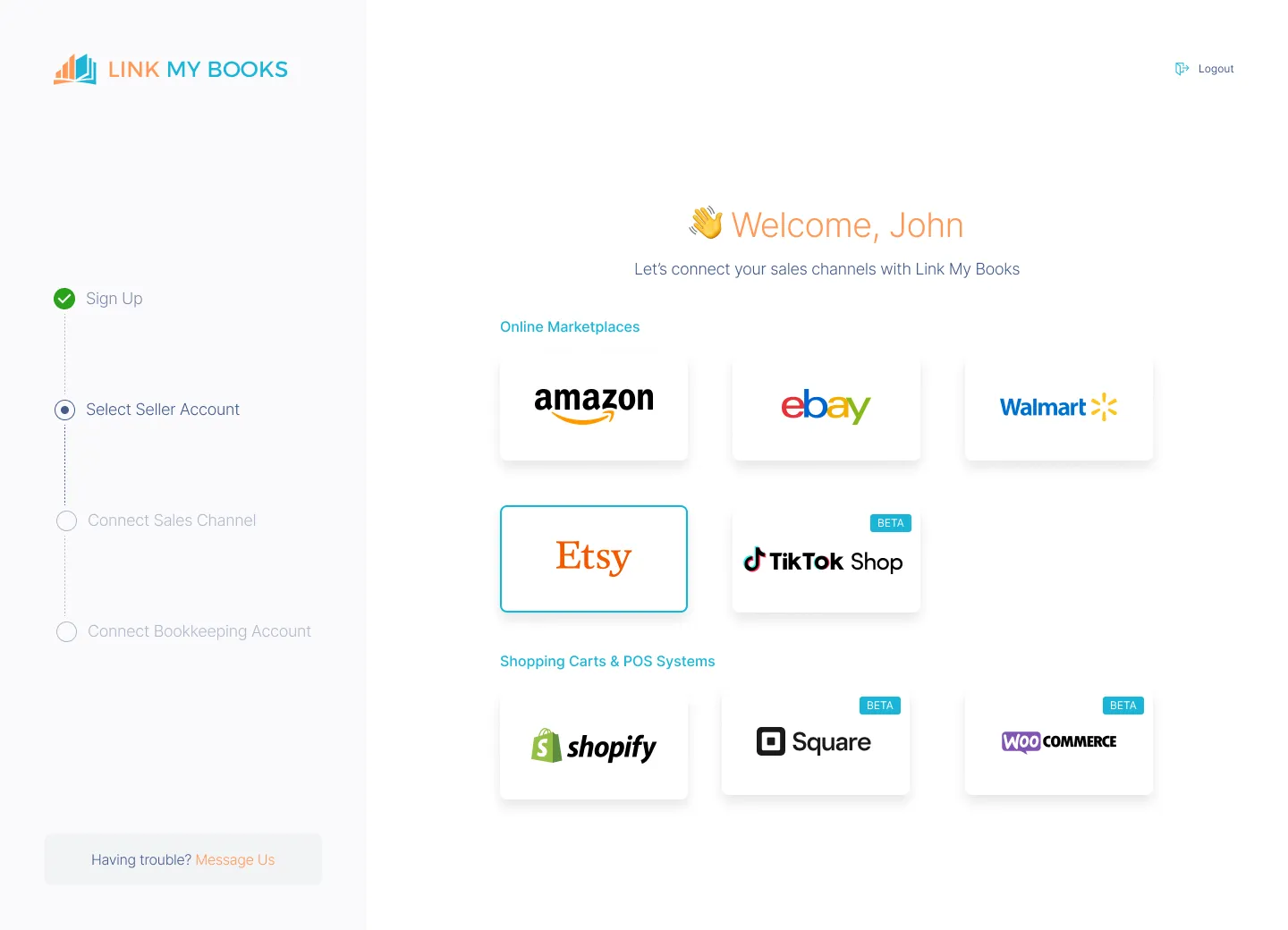
- Connect Etsy to Xero or QuickBooks via Link My Books.
- This integration ensures seamless data flow between the platforms.
- Authorize access, and Link My Books will begin importing your recent Etsy payouts.
Step 2: Configure Your Tax Settings
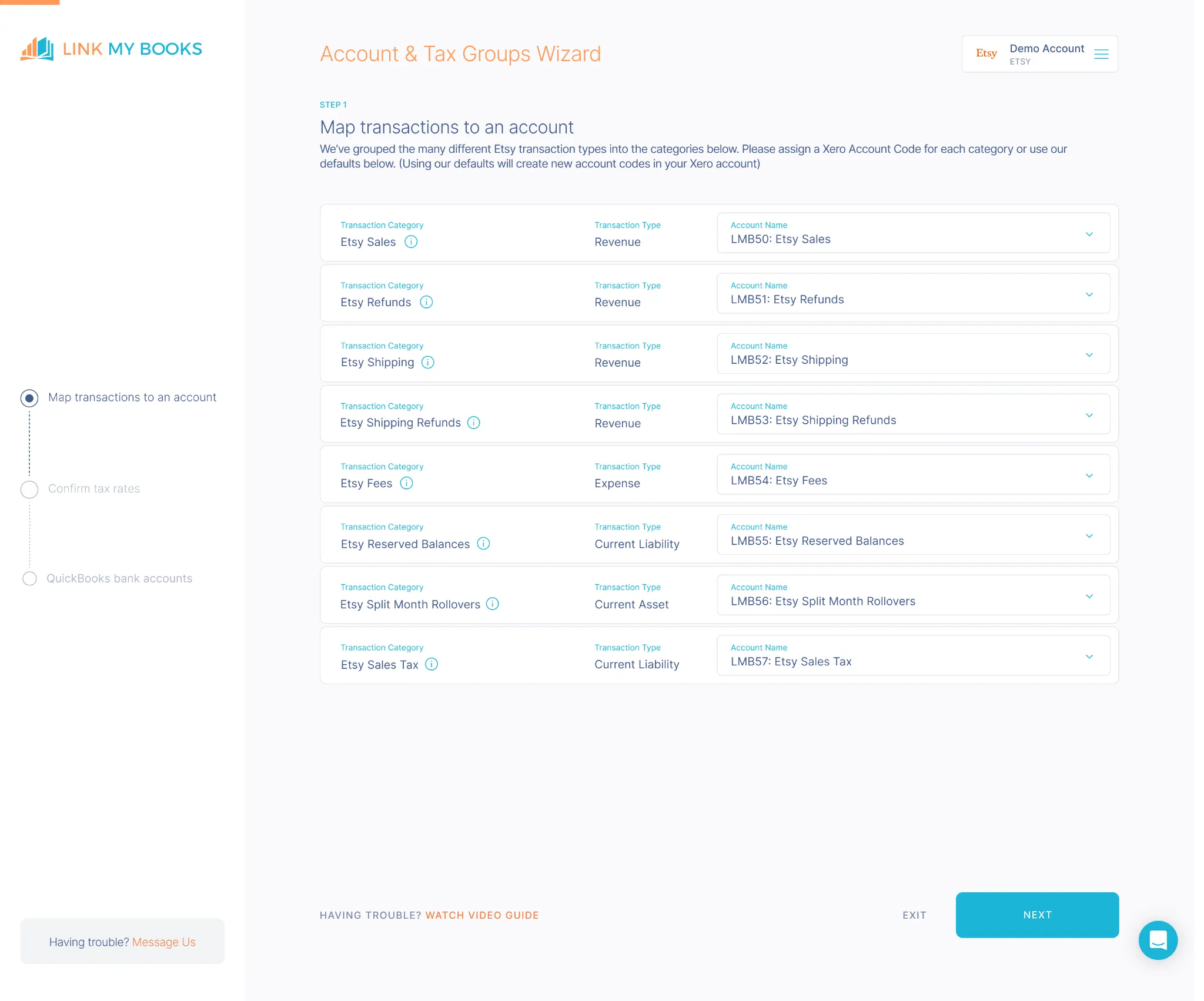
- Use the guided tax wizard to set up VAT or sales tax preferences.
- Etsy’s Marketplace Facilitator taxes are automatically separated, so you never double-report.
- Whether you sell within the UK, EU, or US, Link My Books ensures each transaction is tagged with the correct tax code.
Step 3: Sync Your Payouts

- Link My Books automatically fetches all Etsy payout data - including sales, refunds, fees, and taxes - and organizes it into an easy-to-read summary.
- Each summary is mapped to your QuickBooks or Xero chart of accounts, so there’s no manual categorization required.
Step 4: Reconcile in One Click

- Each Etsy payout is summarized into a single entry that perfectly matches your bank feed.
- When you open your reconciliation screen, you’ll see every deposit ready to approve instantly - no spreadsheets, no manual matching.
Step 5: Review and Relax
Your books are accurate, VAT-compliant, and audit-ready.
You’ll always know exactly how much you’ve earned, what you’ve spent on fees, and how much tax has been collected or remitted.
✅ In under 15 minutes, Link My Books turns messy Etsy data into clean, compliant accounts.
👉 Start your free trial today and simplify your Etsy accounting in minutes.
How to Get an Etsy Transaction Report Manually
If you prefer to pull your Etsy transaction report yourself, you can do it directly from your Shop Manager dashboard. Just be aware that Etsy exports multiple types of CSV files (Orders, Payments, Fees, and Deposits), so you’ll often need to combine them for a complete financial picture.
Follow these verified steps from Etsy’s help center and seller forums:
Step 1: Log In to Your Etsy Account
- Go to etsy.com and open Shop Manager.
Step 2: Navigate to Download Data
- In the left-hand menu, click Settings → Options → Download Data.
Step 3: Choose Your Report Type
Under Orders, select the report you want to export. The most useful for bookkeeping are:
- Etsy Payments Sales – includes order totals, refunds, and fees.
- Etsy Payments Deposits – shows payout amounts and dates.
- Orders or Order Items – provides item-level detail (optional).
Step 4: Select Your Date Range
- Use the drop-downs to choose the Month and Year you want.
- If you need a full year, leave the Month blank and select only the Year.
Step 5: Download the File
- Click Download CSV to export your data. The file will save to your computer automatically.
Step 6: Organize the Data in Excel or Google Sheets
Open your CSV file and:
- Separate sales, refunds, fees, and taxes into different columns or tabs.
- Create subtotals for each category to track performance.
- Compare totals with your bank deposits or Etsy Payment Account to ensure accuracy.
Step 7: Check Monthly Statements (Optional)
- For billing details like ad spend or listing fees, go to Shop Manager → Finances → Your Bill or Monthly Statements and export the monthly CSV file.
Note: Etsy payout cycles can span several days, meaning one deposit may cover transactions from different dates. Always match your report totals to payout amounts rather than order dates.
How Link My Books Makes Accounting for Etsy Easy

What takes hours manually now takes minutes.
- Auto-imports Etsy data into Xero or QuickBooks
- Breaks down payouts into sales, refunds, and fees
- Applies the correct tax rates automatically (UK VAT, OSS, US sales tax)
- Reconciles your Etsy payouts with your bank in one click
What sets Link My Books apart is its expert support team, UK-based qualified accountants who understand the complexities of e-commerce bookkeeping. From setup to reconciliation, they’re there to guide you every step of the way, helping you avoid compliance issues and costly VAT mistakes.
Here’s what you can expect:
Accurate Tax Calculations

Link My Books automatically applies the correct tax treatment to every transaction, whether it’s VAT, OSS, or US sales tax, so you can get your Sales Tax Report and stay compliant with local and international tax laws.
Clean, Organized Reporting

Every Etsy payout is broken down into clear summaries of sales, refunds, seller fees, and taxes, ready for instant reconciliation in Xero or QuickBooks.
COGS Tracking for Real Profit

Accurate profit calculations start with real-time tracking of your cost of goods sold. Link My Books automates this, so you always know your true margins.
Easy Setup & Free Onboarding

The guided setup wizard is simple to follow, and if you want extra help, you can book a free 1:1 onboarding session with an expert.
Whether you’re running a small Etsy shop or managing thousands of monthly orders, Link My Books scales with your business, no spreadsheets, no stress.
👉 Start your free trial today and see how easy Etsy accounting can be!
Essential Etsy Transaction Report Figures to Know
Etsy’s downloadable transaction report provides an in-depth look at your shop’s financial activity - but only if you know what each column means. Understanding these figures is key to reconciling your Etsy payouts correctly and ensuring VAT or sales tax compliance.
Here’s a breakdown of the most important figures you’ll see in your report:
Component
What It Shows
Why It Matters
Sales
The gross amount from customer orders before any fees or refunds are deducted.
This figure drives your top-line revenue and is the base for VAT or sales tax calculations.
Refunds
The value of returned or canceled transactions.
Reduces your taxable income and impacts profit margins.
Fees
Etsy charges including transaction fees, listing fees, and ad spend.
Deductible business expenses that directly affect your profit reporting.
VAT or Sales Tax
Tax collected and either remitted by Etsy (Marketplace Facilitator) or due from you.
Essential for ensuring you don’t double-report or miss tax liabilities.
Shipping Income
Amounts collected from buyers for shipping.
Must be reported as income and matched against actual shipping costs for accuracy.
Payouts
The net deposits transferred from Etsy to your bank account.
These should align exactly with the “Deposit” entries on your Etsy Payment Account and bank feed.
Tip: Always cross-check your “Payout” totals with your Etsy Payment Account under Shop Manager → Finances → Payment Account to ensure every transaction matches your bank deposit.
Why You Need an Etsy Transaction Report (and When You Don’t)
Your Etsy transaction report is the master record of your shop’s financial activity - showing every sale, refund, fee, and tax. It’s essential if you’re managing your bookkeeping manually, but completely optional once you automate your accounting with Link My Books.
If You’re Doing Bookkeeping Manually
You’ll need to download the report each month to:
- Track sales, fees, and refunds accurately
- Reconcile Etsy payouts with your bank deposits
- Calculate VAT or sales tax obligations
- Prepare your year-end or quarterly financial reports
In short, the transaction report is the backbone of manual Etsy bookkeeping - but also the most time-consuming part of it.
If You’re Using Link My Books
You don’t need to download Etsy’s transaction report at all.
Link My Books automatically:
- Pulls every sale, fee, and refund directly from Etsy
- Applies the correct VAT or sales tax treatment
- Posts clean summary entries into Xero or QuickBooks that match your bank feed to the cent
So instead of juggling CSV files, you’ll have accurate, audit-ready data updated automatically every time you get paid.
Manual reports are necessary if you’re still working in spreadsheets - but once you connect Etsy to Link My Books, every figure you need (sales, fees, VAT, and profit) flows into your books automatically.
No downloads, no sorting, and no risk of missing a transaction.

How to Use Etsy Transaction Report Figures for VAT and Sales Tax
When you export your transaction report from Etsy, you’ll see values for sales, refunds, fees, taxes, and payouts. To ensure your bookkeeping is accurate and tax-compliant, you need to map these values correctly:
Identify tax collected by Etsy for you
- In the U.S., under marketplace facilitator laws, Etsy automatically calculates, collects, and remits sales tax on behalf of sellers for orders shipped to many states.
- For example, the Etsy help article says: “The amount of the sales tax that Etsy collects and remits will be summed for your reference in your Payment account under your Activity summary … next to Sales tax paid by buyer (Remitted).”
- In international markets, Etsy collects VAT or equivalent tax in certain countries and on certain goods (especially digital goods).
Takeaway: Don’t assume you must remitting sales tax/VAT for every transaction - check if Etsy already did so.
Separate the tax portion from your net income
- In your report, the tax line (sales tax or VAT) should not be treated as revenue - it is collected for a tax authority.
- When using your report for accounting, mark the tax portion separately so that your income figure excludes that tax amount.
Takeaway: Use proper tax codes in your accounting software (e.g., Xero/QuickBooks) so that the tax collected is reported correctly - not counted as regular income.
Calculate your VAT/sales tax obligations where Etsy hasn’t collected
- Some states or countries require you to collect tax yourself - especially for sales outside Etsy or in jurisdictions where Etsy isn’t yet a facilitator.
- Use the figures from your transaction report (sales minus refunds etc) to determine tax-relevant base amounts.
Takeaway: Even if Etsy handles some parts, you may still have filing obligations (e.g., income tax or sales tax returns) depending on your nexus and sales channels.
Match report figures to your payout and reconcile for accuracy
- Use the “Payout” value in the report to ensure your bank deposits align with the accounting entries.
- The payout should reflect: gross sales minus refunds, fees, plus/minus taxes as applicable.
Takeaway: Discrepancies between report totals and bank deposits often point to tax or fee mis-allocation.
Use the figures for VAT or OSS returns (EU) or U.S. state returns
- For VAT in the EU/UK etc: Use your sales and VAT-collected figures to fill in your VAT return, ensuring marketplace facilitator-collected VAT is excluded if already remitted.
- For U.S. state sales tax: If Etsy collected tax, you may only need to report zero taxes collected for those transactions but still file a return reporting gross sales through Etsy.
Takeaway: Properly attributing marketplace facilitator-collected tax in your reports avoids double-reporting or under-reporting.
Manual vs Automated Reporting With Link My Books
While Etsy’s transaction reports provide every detail you need, extracting useful financial data from them manually can be exhausting. Automation with Link My Books eliminates that manual effort - saving hours each month and preventing costly VAT or reporting errors.
Component
Manual Etsy Reporting
Automated With Link My Books
Why It Matters
Data Source
Seller downloads multiple CSV files (Orders, Payments, Fees, Deposits).
Automatically pulls all Etsy transactions into Xero or QuickBooks.
Saves time and avoids missed or duplicate files.
Categorization
Seller manually separates sales, fees, refunds, and tax lines in spreadsheets.
Link My Books applies correct categories automatically using your account mappings.
Ensures every line item is coded accurately.
VAT / Sales Tax Handling
Manual calculation and adjustment required; high risk of double-counting or omission.
Automated VAT and Marketplace Facilitator logic separates taxes correctly for each sale.
Guarantees compliance and prevents overpayment.
Reconciliation
Seller must manually match Etsy payouts to bank deposits.
One-click reconciliation - each payout matches your bank feed automatically.
Keeps your books perfectly balanced.
Multi-Currency Support
Currency conversions must be handled manually using bank rates.
Automatically applies the correct exchange rate for every settlement.
Maintains accurate profit and FX reporting.
Time Spent
2–3 hours per month (minimum, for small sellers).
10–15 minutes per month.
Automation frees you to focus on selling, not spreadsheets.
Bottom line: With Link My Books, you get clean, categorized, and tax-ready Etsy data automatically - no downloads, no manual reconciliations, and no risk of reporting the wrong figures.
FAQ on Etsy Seller Sales and Tax Reporting
Will Etsy send me a 1099?
If you meet the IRS reporting criteria for third-party settlement organizations, Etsy will issue Form 1099-K and make it available in your account. Thresholds can change, so check your tax center in Etsy and your accountant’s guidance when filing. If you want to avoid manual data prep altogether, see our guide to Etsy bookkeeping.
How can I find sales by country on Etsy?
Export your CSV, then filter by ship-to country to see totals by destination. If you need ongoing country-level VAT breakdowns without spreadsheets, connect Link My Books and use our automated mapping.
How far back can I see Etsy sales?
You can export historical CSVs from your Shop Manager for prior periods. For performance trends and growth insights beyond raw CSVs, check out our analysis tips in Etsy sales statistics.
Can I pull fee data from Etsy?
Yes. Your CSVs include transaction fees, listing fees, and ad spend. For cleaner books, post fees to a separate expense account. Link My Books does this automatically as part of your Etsy accounting software setup.
Does Etsy automatically take out sales tax or VAT?
In many jurisdictions Etsy acts as a marketplace facilitator and collects/remits tax on your behalf. Your CSV and payment account will show these amounts.
How do I download an Etsy transaction report?
Go to Shop Manager → Settings → Options → Download Data, choose your report type and date range, then download the CSV. If you’d rather skip CSVs, Link My Books pulls the same data and posts clean summaries straight into your ledger.
How do I connect Etsy to QuickBooks or Xero without spreadsheets?
Use Link My Books. Connect Etsy, run the tax wizard, and enable posting so each payout matches your bank feed for one-click reconciliation.
What should I do if my bank feed doesn’t match my Etsy deposit?
This usually means fees, refunds, or marketplace-collected tax were not separated correctly. Rebuild the payout from your CSV totals, or let Link My Books create a single summary entry that matches your bank deposit exactly.
Can I reconcile multiple Etsy shops in one accounting file?
Yes, but keep each shop’s data clearly separated. Link My Books supports multiple shops and posts entries with distinct references so reconciliation stays clean.
How should I record shipping income from Etsy?
Treat amounts charged to customers for shipping as income, then offset with your actual shipping costs. Link My Books separates shipping lines automatically so your margins remain accurate.
Simplify Etsy Accounting With Link My Books

Manually downloading and analyzing Etsy transaction reports might work when your shop is small, but as your order volume grows, spreadsheets quickly become unmanageable. Every payout includes dozens of hidden fees, refunds, and VAT adjustments that are easy to miss - and a single mistake can throw off your books for months.
Link My Books eliminates all that guesswork. It connects Etsy directly to your accounting software, automatically categorizing sales, fees, and taxes so every payout matches your bank feed perfectly.
You’ll save hours each month, prevent tax overpayments, and always have accurate, audit-ready books.
Integrating your Etsy account with Link My Books automates your bookkeeping and ensures complete accuracy across every transaction.
👉 Start your free 14-day trial of Link My Books today and experience effortless Etsy accounting.




.webp)





.png)