


Walmart payouts can look clean in your bank feed, but the numbers behind them rarely tie out cleanly without a system. One payout can include product sales, refunds, Walmart fees, shipping credits, and marketplace-collected tax. If you track only the net deposit, you lose visibility on fees and profitability, and reconciliation turns into a monthly guessing game.
This guide gives you a free Walmart bookkeeping spreadsheet you can use to track payouts and stay consistent each month. I’ll also show you exactly where to pull the right totals from Walmart Seller Center so your spreadsheet matches what actually happened.
If you want to skip spreadsheets entirely, Link My Books automates Walmart accounting by turning each payout into a clean summary that posts into Xero or QuickBooks and reconciles against the bank deposit without manual sorting.
Key Takeaways from this Post
Walmart payouts bundle a lot of moving parts: Item sales, refunds, referral fees, WFS charges, shipping credits, and tax lines that can distort your true revenue if you log only the net deposit.
A spreadsheet helps you separate those components so your monthly numbers reconcile and your profit picture stays real, but it still takes discipline and careful data entry.
If you want clean books without the manual work, Link My Books automates the process by posting accurate Walmart payout summaries directly into Xero or QuickBooks.







Who Should Use This Spreadsheet?
Use this Walmart bookkeeping spreadsheet if you need a simple, repeatable way to track payouts and keep your numbers consistent month to month.
- New Walmart sellers: You want a clean habit early, before volume makes cleanup painful.
- Low to moderate order volume sellers: You can still manage monthly entries without drowning in line items.
- Sellers who need clean payout reconciliation: You want your totals to match what hits the bank without chasing mismatches.
- Bookkeepers supporting Walmart Marketplace clients: You need a standardized intake template before you move the client into a tool or a monthly workflow.
- Sellers with tax complexity: You need to separate tax lines, fees, and refunds so you don’t misstate revenue or overpay.
🔥 Download our Walmart seller accounting spreadsheet here 🔥
Here’s the free Walmart accounting spreadsheet template. It includes a monthly payout summary, a place to log sales, refunds, fees, and taxes, and a simple reconciliation check so your spreadsheet ties to the net payout that lands in your bank account.
How to Use the Spreadsheet
You’ll use this spreadsheet the same way every month: pull the payout-period totals from Walmart, drop them into the template, then confirm the net payout matches your bank deposit.
Quick steps:
- Confirm the transaction types you’re tracking.
- Confirm your tax setup (VAT or sales tax handling).
- Enter totals for the payout period and reconcile to the bank payout.
Confirm the Transaction Types
Before you enter anything, make sure you track these categories consistently for every payout period:
- Sales: Item revenue and any shipping income shown in reports.
- Refunds and adjustments: Returns, partial refunds, and any corrections that reduce revenue.
- Walmart fees: Referral fees (commission), WFS fees (if applicable), and other program charges.
- Taxes: Marketplace-collected tax lines and any other tax-related entries shown in the payout data.
Confirm Your Tax Setup (Walmart)
Set your tax assumptions once so you stay consistent every payout period:
- Marketplace sales tax (typical Walmart setup): Walmart collects and remits sales tax for marketplace-facilitated transactions in many jurisdictions, and you’ll still see tax-related lines in Walmart reports. Track those tax amounts separately so you don’t record them as revenue.
- Your responsibility scenarios: If you also have direct sales outside Walmart, you operate with physical nexus in a state, or local rules require reporting marketplace sales on returns, confirm your accountant’s reporting approach and keep the supporting records from Walmart Statements and the Payments Report.
Enter the Payout Period Totals and Reconcile
For each payout period:
- Enter the payout period dates.
- Enter totals for sales, refunds, fees, and taxes.
- Check the reconciliation line: Your spreadsheet’s net total should equal the payout deposit that hit your bank.
Common mistakes that create mismatches:
- Entering net payout as revenue and skipping fees entirely.
- Forgetting refunded fees or shipping reversals.
- Counting marketplace-collected tax as your income.
Where to Get the Figures in Walmart Seller Center
You’ll pull payout-period totals from Payments: Statements in Walmart Seller Center, then download the Payments Report (Walmart also calls it the Reconciliation Report) for the same period. The Statements view gives you the payout-level summary. The Payments Report gives you the line-level detail behind that payout, including shipping charges, commissions, and other activity.
Read more at: Walmart Marketplace Learn
Open the correct payout period in Statements
In Walmart Seller Center:
- Go to Payments: Statements
- Use the dropdown to select a Period summary
- Pick the closed period that matches the bank deposit you’re booking.
Tip: Walmart payment frequency typically runs bi-weekly (about every 14 days), so you’ll repeat this workflow twice per month for most accounts.
Download the Payments Report for that period
From the same Statements screen:
- Click Download (upper right)
- Select Payments Report (aka Reconciliation Report)
- Choose the new summarized version if you want cleaner totals for bookkeeping (less noise, easier month-end)
Use these figures to populate the spreadsheet.
How to Find Out Your Profits
Walmart payouts tell you what hit the bank, not what you earned. To get real profit, you need to break each pay period into: sales, refunds, fees, and tax handling, then layer in COGS and fulfillment costs.
Walmart’s Payments reporting and referral-fee schedules help you sanity-check whether fees look right for your category.
Profit formulas to use
- Net sales (before fees): Gross sales minus refunds
- Contribution margin: Net sales minus Walmart fees minus fulfillment costs
- Gross profit: Contribution margin minus COGS
- Operating profit: Gross profit minus operating expenses (software, ads, payroll, etc.)
Profit table: What to track and where it comes from
Alternatives to Using a Spreadsheet
Since this spreadsheet will work for relatively low-volume orders, here are other options you can consider if you are beginning to scale:
Manual bookkeeping inside Xero or QuickBooks
You can book Walmart activity manually and reconcile deposits, but the time cost rises fast once refunds and fee lines stack up across periods.
Connector apps
Some connectors push transactions into accounting software, but many create noisy data or entries that don’t match deposits cleanly. That’s how you end up with clearing accounts that never zero out.
Link My Books (recommended)
If you want clean books without spreadsheet upkeep, Link My Books automates Walmart payouts into Xero or QuickBooks using payout-based summaries built for reconciliation.
How Link My Books Makes Walmart Bookkeeping Simple and Fast
Spreadsheets break when your pay periods pile up and reconciliation starts eating your week. Link My Books replaces that manual workflow by translating each Walmart settlement into a clean summary that matches the bank deposit.
Manually downloading Walmart reports? That’s old news.
✅ Auto-import of all Walmart sales, fees, and refunds
✅ One-click payout reconciliation
✅ Accurate tax mapping on every transaction
✅ Clean summaries, ready for Xero or QuickBooks
Here’s what you get when you use Link My Books:
Automated Transaction Syncing

Every sale, refund, and fee from Walmart is automatically pulled in and correctly categorized. No manual data entry. No errors. Just clean, organized financials you can trust.
Detailed Financial Reporting
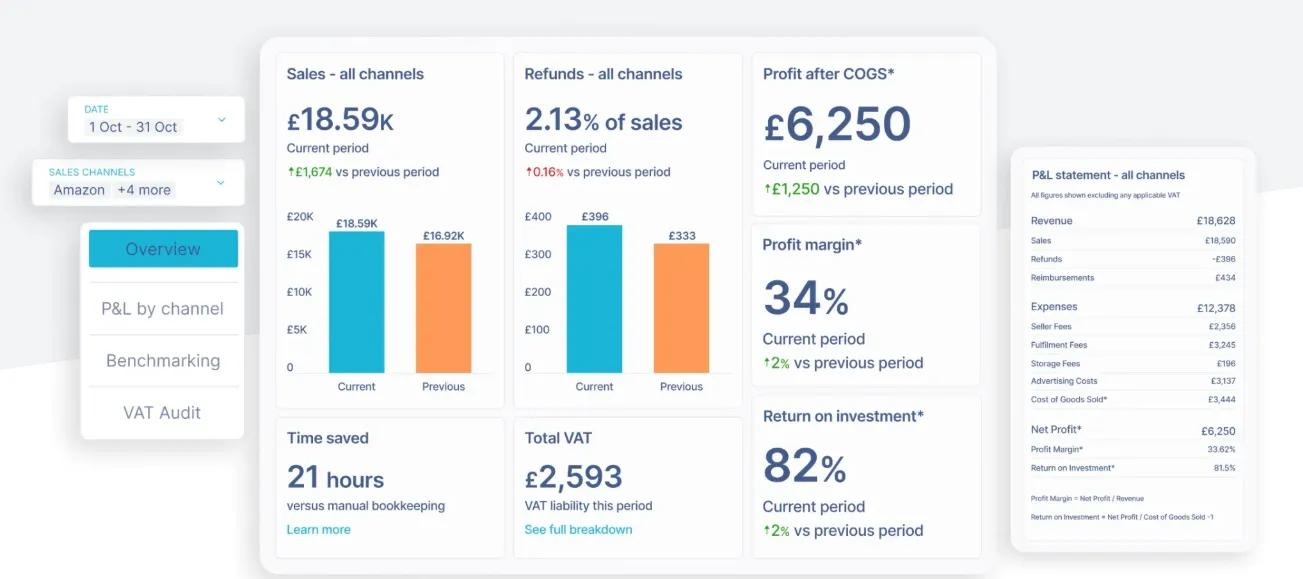
Get full visibility into your business performance with breakdowns of revenue, expenses, seller fees and margins across all your connected sales channels. Perfect for spotting trends and making smarter, data-backed decisions.
Accurate Sales Tax Calculations

Struggling with marketplace facilitator rules or VAT? Link My Books automatically applies the correct sales tax (including VAT, GST, and regional rules), and syncs seamlessly with your tax software, so you’re always compliant, everywhere you sell.
COGS Tracking
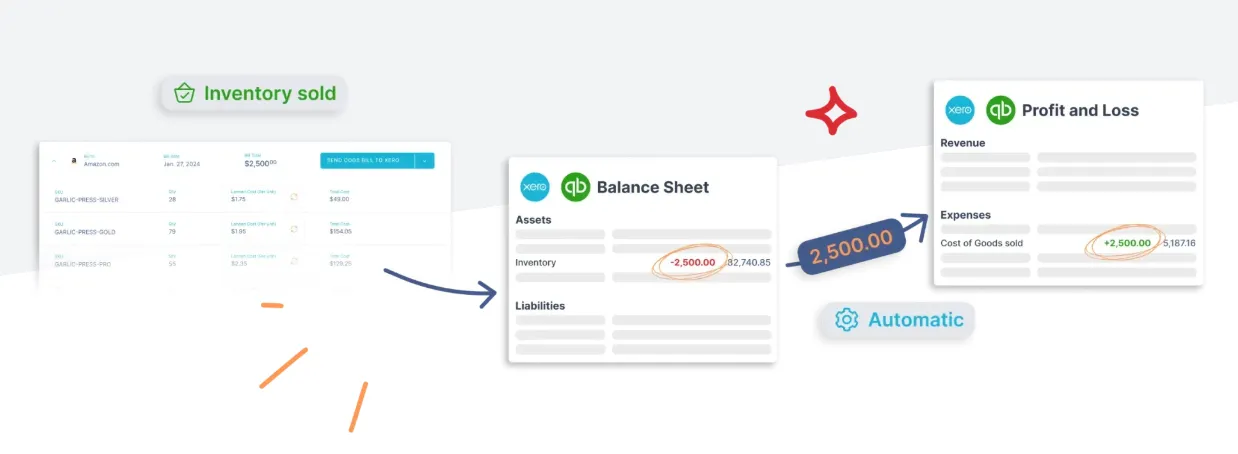
Track your profit margins the right way. Link My Books moves inventory costs from your balance sheet to your profit and loss as sales happen, keeping your accounts accurate without the need for extra tools.
Built to Scale

Whether you're running one store or ten, Link My Books handles high-volume data without slowing you down. Manage multiple marketplaces in one dashboard and streamline your accounting as you grow.
Audit & Tax Ready
Every payout is reconciled. Every transaction is traceable. With audit-ready records and no discrepancies, tax season becomes a breeze instead of a panic.

You can try Link My Books for 14 days, completely free of charge!
FAQ
Where do I find Walmart payout reports for bookkeeping?
Use Walmart Seller Center payments reports (Payments: Statements) and download the reconciliation report for the closed pay period. Walmart generates reconciliation reports after the settlement period closes.
Why doesn’t my bank deposit match my Walmart sales total?
Because your deposit reflects the net settlement after refunds and fees. Also, Walmart reports ties activity to the closed pay period, which can include shipped orders and refunds generated within that period. Follow these steps to see your Walmart sales report.
How do I sanity-check Walmart referral fees?
Use the official Walmart referral fee schedule by category to verify whether your fees look plausible for what you sold.
Does Walmart collect and remit sales tax?
In many states, Walmart Marketplace acts as a marketplace facilitator and collects and remits sales tax on qualifying orders shipped and delivered to listed states. Keep the supporting reports because some states still require sellers to report marketplace sales even when the marketplace remits the tax.
What’s the fastest way to reconcile Walmart deposits in accounting software?
Use a payout-based approach: one entry per settlement that matches the deposit. If you’re doing it manually, see how to reconcile Walmart payments in Xero workflow or how to reconcile Walmart payments in QuickBooks workflow, so your clearing account actually clears.
Is there a faster way than using a spreadsheet?
Yes. If your goal is clean books with minimal manual work, Link My Books automates Walmart bookkeeping by turning each settlement into a reconciliation-ready summary in Xero or QuickBooks.
Make Your Walmart Accounting Simple With Link My Books

A spreadsheet can keep you organized, but it still depends on pulling the right reports, mapping fees correctly, and reconciling every settlement to the bank deposit.
If you want to remove that manual workload, Link My Books automates Walmart settlements into Xero or QuickBooks with clean summaries for sales, refunds, fees, and tax lines, so month-end closes faster and your numbers stay audit-friendly.
🚀 Try Link My Books free for 14 days - no credit card required, no more spreadsheet stress. 👉 Start your free trial now




-optimized.webp)




.png)